
AI agent frameworks are software libraries that turn a language model into an agent. They give the model tools it can call, instructions to follow, memory of the session, a loop that keeps working until the task is finished, and logs you can inspect. Well-known examples include Microsoft Agent Framework, the OpenAI Agents SDK, LangGraph, CrewAI and Google’s Agent Development Kit.
Run a business in Australia and keep hearing about agentic AI? Then this guide’s for you. It explains what an agent framework actually does, when one agent’s enough and when several make sense, and how the main frameworks compare. It also covers when you don’t need a framework at all (yes, that’s a real option), and which privacy and security checks apply before any customer data goes near one. If you’d rather have a team scope it with you, our AI chatbots and agents service covers that.
What Is an AI Agent Framework, and What Makes Something an Agent?
Start with the agent. OpenAI describes agents as “systems that independently accomplish tasks on behalf of users”. In its practical guide to building agents, OpenAI adds two traits. The agent uses a large language model to run the workflow and make decisions, and it can stop and hand control back to the user if something fails. It also has tools to gather context and take actions, and it picks the right tool for the current step.
That rules a fair bit out. According to the same guide, apps that use a language model but don’t let it control the workflow, such as simple chatbots, single-turn prompts or sentiment classifiers, aren’t agents. If that line’s the bit you’re unsure about, our comparison of AI agents and chatbots covers it in detail.
A framework is the layer of code that saves you writing the same plumbing for every agent. Without one, a developer has to build the loop that calls the model, reads its tool requests, runs the tools, feeds results back and decides when to stop. They also have to log every step so someone can work out later why the agent did what it did. Honestly, it’s tedious work, and it’s the same tedious work every time. A good agent framework packages those pieces, so your team spends its time on the business logic instead of the scaffolding.
Here’s the distinction that matters. Generative AI on its own writes text. An agent built on a framework can read your data, take an action in another system and check its own result. Big difference. And it’s why AI systems built this way need more care than a chat window.
What Does an Agent Framework Actually Give You?
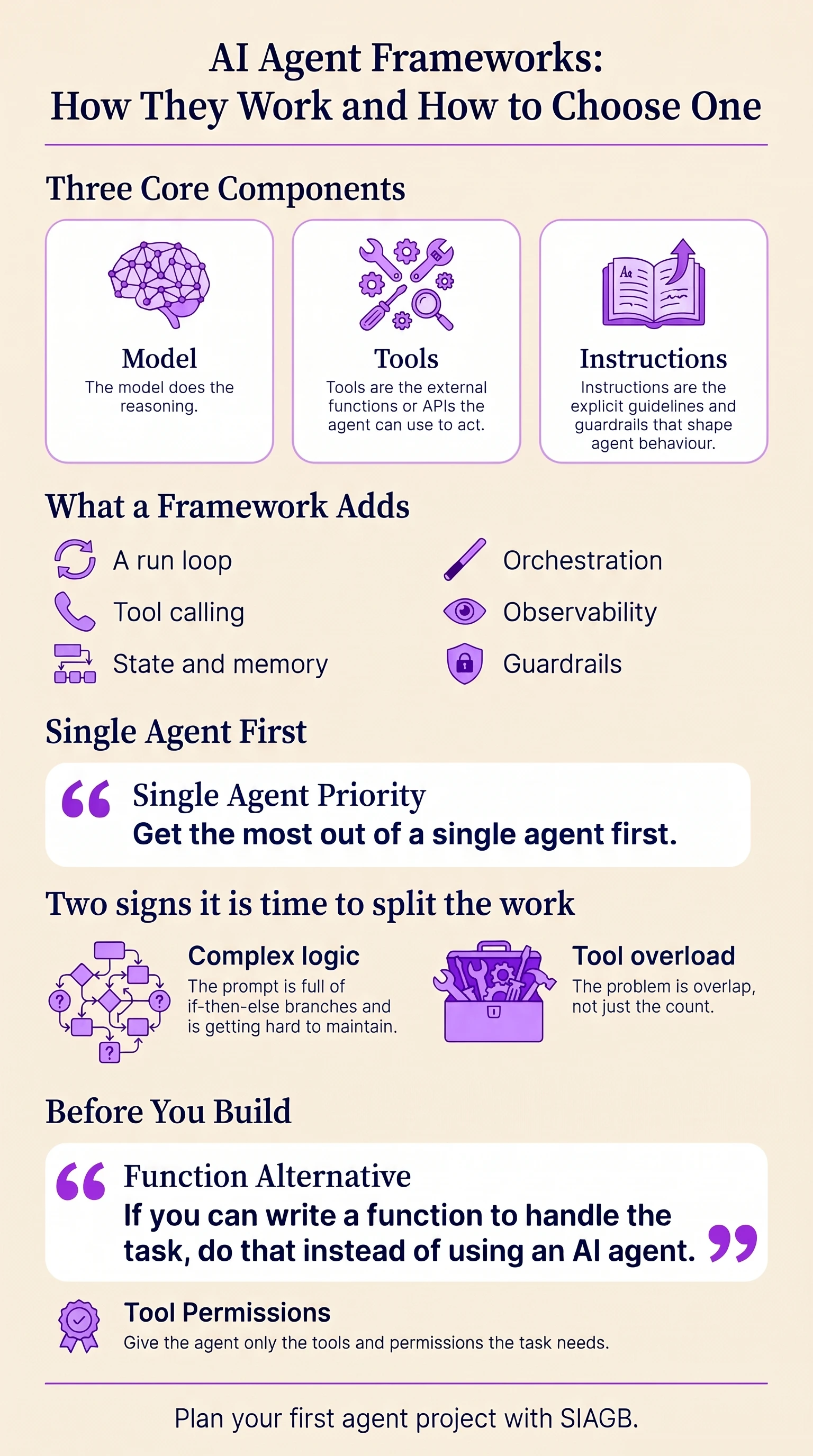
OpenAI’s guide says that in its most basic form, an agent consists of three core components: a model, tools and instructions. The model does the reasoning. Tools are the external functions or APIs the agent can use to act. Instructions are the explicit guidelines and guardrails that shape agent behaviour.
The guide sorts tools into three types:
- Data tools fetch context, such as querying a CRM, reading a PDF or searching the web.
- Action tools change something, such as updating a record, sending an email or passing a ticket to a person.
- Orchestration tools are other agents used as tools, such as a research agent called by a manager agent.
A framework wraps those components in the parts you need to build agents that hold up in daily use:
- A run loop. The agent keeps calling the model until an exit condition is met, such as a final answer, an error or a maximum number of turns.
- Tool calling and tool integration. You describe each tool once, and the framework handles the requests and responses between the model and your external tools.
- State and memory. The framework keeps track of the conversation and any working notes across steps.
- Orchestration. It routes work between agents, or between agents and ordinary functions.
- Observability. Traces show every model call, tool call and decision, which makes debugging possible.
- Guardrails. Checks run on inputs and outputs, and risky actions can pause for a person.
Microsoft’s documentation shows how a full framework groups these parts. It says Microsoft Agent Framework brings together four primary areas: agents, a harness agent, workflows and integrations. Underneath sit model clients, an agent session for state, context providers for agent memory, middleware that can intercept agent actions, and MCP clients for tool integration.
Model choice is part of the job too. OpenAI suggests building the first prototype with the most capable model to set a performance baseline, then trying smaller AI models on each task to cut cost and delay where accuracy holds. A framework that lets you swap models without rewriting your agent logic makes that kind of testing much easier. It’s one of the quieter agent capabilities, and an easy one to forget.
Single Agent or Multi Agent: Which Pattern Fits the Job?

OpenAI’s guide says orchestration patterns fall into two groups. A single-agent system is one model with the right tools and instructions running in a loop. A multi agent system spreads the work across multiple agents that coordinate with each other.
Its general advice? Get the most out of a single agent first. More agents give a tidy separation of concerns, but they add complexity and overhead, and often one agent with tools is enough. A single agent can grow by adding tools one at a time, which keeps testing and maintenance manageable. Slower, sure. But far easier to debug.
That’s also where we start on agent projects. When we scope one, we look for the single use case with the most impact: where your team loses the most time to repetitive work, or where customers keep getting stuck. Then we gather what the agent will draw on (support transcripts, product docs, FAQs, internal wikis) and test its responses against real scenarios from your business. All of that happens before anyone talks about a second agent.
The guide names two signs that it is time to split the work:
- Complex logic. The prompt is full of if-then-else branches and is getting hard to maintain.
- Tool overload. The problem is overlap, not just the count. OpenAI says some implementations successfully manage more than 15 well-defined, distinct tools while others struggle with fewer than 10 overlapping tools. Clearer tool names and descriptions should come first; more agents come after that fails.
When you do move to multi agent orchestration, two patterns cover most cases:
- Manager pattern. A central agent calls specialised agents as tools, collects their results and stays in charge of the conversation. This suits work where one agent should own the user experience.
- Decentralised pattern. Agents work as peers and hand off the task to one another. A triage agent might pass a refund question to a support agent, which then owns the rest of that conversation.
OpenAI’s Agents SDK builds handoffs in as a core feature, described as a way to transfer control between agents. Microsoft takes a more explicit route: its workflows connect agents and functions through defined execution paths, so you can see the multi agent workflow as a graph.
Be careful with the word “autonomous”. Autonomous AI agents that plan and act across many systems with no checkpoints make a good demo but a risky first project. OpenAI says customers typically succeed more often with an incremental approach than by building a fully autonomous agent with a complex design straight away. Not the exciting answer, we know. Still, agentic systems earn trust one task at a time.
How Do the Main AI Agent Frameworks Compare?
There are many agentic frameworks, and they change quickly (names included, as you’ll see). The table below compares several that come up most often when businesses ask about them. It’s based on each vendor’s own documentation as read in November 2026, and it describes design choices rather than ranking quality.
| Framework | Maintained by | Core idea | Multi-agent style | Good fit when |
|---|---|---|---|---|
| Microsoft Agent Framework | Microsoft | Agents plus graph-based workflows, sessions, middleware and telemetry; successor to Semantic Kernel and AutoGen | Workflows with explicit execution paths | Your team writes .NET or Python and already uses Azure or Microsoft Foundry |
| OpenAI Agents SDK | OpenAI, open source | A small set of building blocks: agents, handoffs, guardrails, tracing | Handoffs, or agents called as tools | You want a light library and quick prototypes |
| Foundry Agent Service | Microsoft | A managed service that hosts and scales agents, not a coding library | Runs agents built with any framework | You want hosting, identity and tracing handled for you |
| LangGraph | LangChain team, open source | Agent logic modelled as a graph of steps with saved state | Nodes and edges in a graph | You need fine control over long-running, stateful flows |
| CrewAI | CrewAI, open source | Role-based agents that work together as a crew | Agents with roles and shared tasks | You think about the problem as a team of roles |
| Agent Development Kit (ADK) | Google, open source | A code-first toolkit to build, test and deploy agents | Agents composed into larger agents | Your stack leans on Google Cloud |
| Pydantic AI | Pydantic team, open source | Type-safe Python agents with structured outputs | Agents calling other agents | Your developers value strict typing in Python |
A few points from the vendor documents are worth knowing, because the table can’t hold them.
The Microsoft Agent Framework is described as the direct successor of Semantic Kernel and AutoGen, created by the same teams. It supports several model providers, including Microsoft Foundry, Anthropic, Azure OpenAI, OpenAI and Ollama, and offers .NET and Python, with a Go version in public preview.
The OpenAI Agents SDK is an open source framework that OpenAI says works with its Responses API and Chat Completions API, and also with models from other providers that offer a Chat Completions style endpoint. So an OpenAI agent built with the SDK isn’t locked to OpenAI models, though some built-in tools are.
Foundry Agent Service sits at a different layer. Part of Microsoft Foundry (the platform earlier sold as Azure AI Foundry), it is a managed platform for building, deploying and scaling AI agents. It offers prompt agents defined by configuration, voice-based prompt agents, and hosted agents where you bring your own code and framework as a container. You can write agents with one of the libraries above and still host them there.
So which are the best AI agent frameworks? The short answer is the one that fits your team’s language, your cloud, your data rules and the size of the job. Bit of a non-answer, I know. The next sections cover how to test that fit, which is the useful part.
Why Do Agent Frameworks Support the Model Context Protocol?
The Model Context Protocol (MCP) is an open standard for connecting AI applications to tools and data. A tool is wrapped once as an MCP server, and any agent that speaks MCP can use it. That cuts down the custom tool integration work that used to be repeated for every framework. Write it once, use it everywhere. Mostly.
Support is now common across agent frameworks. Microsoft Agent Framework includes MCP clients for tool integration, and its agents can call tools and MCP servers directly. Foundry Agent Service goes a step further with toolboxes. You choose a set of tools such as web search, file search, a code interpreter, MCP servers and custom functions. According to Microsoft, those tools are then shared across agents through a single managed MCP endpoint with central authentication, governance and versioning.
The trade-off is trust, and it’s the part people miss. Every MCP server you connect gives an agent a new way to read data or take action in external tools. The Australian Cyber Security Centre notes that AI supply chains can be complex and carry risk, and it suggests a supply chain evaluation and vendors that are open about how they built and tested their systems. Treat each MCP server like any other third-party integration: know who wrote it, what it can touch and how it logs.
Do You Need an Agent Framework, a Workflow Tool or Plain Code?
Not every AI application needs an agent, and it’s worth checking before you build one. Microsoft’s own documentation has a short table on when to use agents and when to use workflows, and it is a useful test.
Use an agent when the task is open-ended or conversational, when you need autonomous tool use and planning, or when a single model call, possibly with tools, will do. Use a workflow when the process has well-defined steps, when you need explicit control over the order things run in, or when several agents or functions must coordinate.
Then comes the line most teams should read twice. Microsoft writes: “If you can write a function to handle the task, do that instead of using an AI agent.” A bit surprising, coming from a company that sells agent tooling. But it’s right. Ordinary code is cheaper to run, easier to test and gives the same answer every time.
OpenAI’s guide gives the other side. It says agents suit workflows that have resisted automation, especially three kinds:
- Complex decision-making, with judgement calls and exceptions, such as refund approvals.
- Rules that are hard to maintain, where a large ruleset has become costly to update.
- Heavy use of unstructured data, such as reading documents or talking with customers in natural language.
If your task doesn’t clearly fit one of those, the guide says a deterministic solution may be enough. In practice that often means plain code, a workflow automation tool, or a single AI assistant step inside an existing process. Our article on how AI agents are replacing traditional automation looks at that comparison from the business side.
Good agent development starts here. In most cases, the AI agent development projects that go well begin with one clear task and the simplest tool that can do it. Boring? A little. It works, though.
How Should an Australian Business Choose an Agentic AI Framework?

Once you know an agent’s the right fit, use a short checklist before you pick an agentic AI framework. None of these steps needs a large budget, and each one removes a common cause of rework (the frustrating kind, where you find the problem after launch).
- Name the task. Write down the single job the agent will do, what it can read, what it can change and what a good result looks like.
- Match your stack. Pick a framework in the language your developers already ship and, where possible, one that fits the cloud you already pay for.
- Check model choice. Confirm the framework can work with more than one model provider, so you can test cheaper AI models later or change vendors. It also means you can pick up new AI capabilities as they ship.
- Know where data goes. The ACSC notes that AI systems are often hosted in the cloud and may send data between regions, and it asks organisations to make sure the system can meet their data residency or sovereignty obligations. It also suggests checking whether your inputs will be used to retrain a third-party model.
- Turn on observability from day one. You can’t fix agent behaviour you can’t see. Tracing of every model call and tool call should be part of the first build, not added later.
- Rate each tool by risk. OpenAI suggests rating tools low, medium or high based on things like read-only or write access, whether an action can be reversed and its financial impact. High-risk actions, such as cancelling orders, approving large refunds or making payments, should go to a person until the agent has proven itself.
- Run a small trial. The ACSC says a trial can help you test how a system works with your security tools in a low-stakes environment, and that you should set its scope and success criteria before it starts.
Most agents also need to reach systems you already run, such as a CRM, booking tool or document store. That connection work is often bigger than the agent itself. Plan for it early. Seriously. When we do this connection work, we keep the AI layer separate from your core systems with an event-driven design, so if the agent has a problem, your existing tools keep running as they did before. Each connection gets error handling, retry logic and monitoring, and we test it in a staging environment before it goes live. Our AI integration page explains how that part of a project usually runs.
What Privacy and Security Rules Apply to AI Systems in Australia?
An agent that reads customer records is handling personal information, so Australian privacy law applies. The Office of the Australian Information Commissioner (OAIC) says privacy obligations will apply to any personal information input into an AI system, as well as the output data generated by AI where that output contains personal information.
The OAIC guidance ties this to several Australian Privacy Principles (APPs):
- APP 3. If AI generates or infers personal information, that counts as a collection and must comply with APP 3.
- APP 6. Personal information put into an AI system should only be used for the purpose it was collected for, unless the person consents or would reasonably expect the secondary use.
- APP 10. You must take reasonable steps on accuracy, including human oversight of AI outputs.
- APP 11. Security obligations apply, including when the product is hosted in the cloud.
The OAIC also asks businesses to update privacy policies and to make sure public-facing AI tools such as chatbots are clearly identified as AI. Fair enough. As best practice, it recommends that organisations don’t enter personal information, especially sensitive information, into publicly available generative AI tools.
Security sits beside privacy. The ACSC’s guidance on engaging with AI warns about prompt injection, where hidden instructions try to hijack a model’s output. It recommends phishing-resistant multi-factor authentication for access to AI systems and least privilege for accounts. For agents, least privilege applies to the agent too: give it only the tools and permissions the task needs. Not “everything, just in case”. Only what the task needs.
For governance, the Department of Industry, Science and Resources publishes a Voluntary AI Safety Standard with 10 guardrails. Guardrail 4 is about testing AI systems and monitoring them once deployed, and guardrail 5 is about enabling human control or intervention. The same page says the department published the Guidance for AI Adoption on 21 October 2025, which sets out six essential practices and evolves the standard. Some teams also use the US NIST AI Risk Management Framework, released on 26 January 2023 and intended for voluntary use.
This is general information, not legal advice. If an agent will handle health, financial or other sensitive information, get privacy advice before it goes live. Worth the cost.
Where Should AI Agent Development Start?
Start small and make every step visible. A sensible first project for most businesses looks like this:
- One narrow task with a clear owner and a clear measure of success.
- One agent, a handful of well-described tools and an agent framework your team can support.
- Tracing switched on, plus a person approving anything that’s hard to reverse.
- And a privacy check before any personal information goes in (easy to skip when the demo’s going well).
When we take an agent live, we launch it with real users in a controlled setting first and watch accuracy and response quality before the full rollout. Anything outside its scope goes to a person, with the conversation’s full context attached. Once that first agent works reliably, widen it with more tools or a second agent only where the complex logic or tool overload signs appear. Remember those two signs from earlier? This is where they earn their keep. If you’d like help to scope a project or build AI agents for your business, our AI chatbots and agents team can talk through what you have in mind.
Key Takeaways
- AI agent frameworks give a language model tools, instructions, memory, a run loop, tracing and guardrails, so your team can focus on business logic.
- Every agent rests on three core components: a model, tools and instructions.
- Get the most from a single agent first, and split into multiple agents only for complex logic or tool overload.
- If plain code or a fixed workflow can do the task, use that instead of an agent.
- In Australia, the Privacy Act and the APPs apply to personal information going into and coming out of AI systems, and ACSC security advice applies to the systems themselves.
FAQ
What are the core parts of an AI agent?
Three parts sit at the centre of every agent: a model that reasons and decides, tools that let it read data or take actions, and instructions that set its rules and limits. A framework then adds the run loop, memory of the session, logging and safety checks around those three parts.
How do Microsoft Agent Framework and the OpenAI Agents SDK differ?
Microsoft Agent Framework is a larger toolkit for .NET and Python that pairs agents with graph-based workflows, sessions and middleware, and it fits naturally with Microsoft Foundry and Azure. The OpenAI Agents SDK is a smaller open-source library built around a few ideas: agents, handoffs, guardrails and tracing. Both can call models from more than one provider.
Which AI agent framework is best for a small or mid-sized business?
There is no single best choice. Most small teams do well with the framework that matches the language they already write and the cloud they already pay for, a managed hosting option if nobody wants to run servers, and built-in tracing. Many first projects need a workflow or a single agent with a few tools, not a large multi-agent system.
Are AI agent frameworks open source?
Many are. The OpenAI Agents SDK, LangGraph, CrewAI, Google’s Agent Development Kit and Pydantic AI are published as open-source projects, and Microsoft describes its Agent Framework as open to community contributions. The models they call and any hosted service you run them on usually have their own paid terms.
Can an AI agent framework work with any language model?
Often, but check before you commit. Microsoft Agent Framework lists Microsoft Foundry, Anthropic, Azure OpenAI, OpenAI and Ollama among its providers, and OpenAI says its Agents SDK works with other providers that offer a Chat Completions style endpoint. Features such as built-in web search may still be tied to one vendor.
Sources
- Microsoft Learn, Microsoft Agent Framework overview.
- OpenAI, A practical guide to building agents.
- OpenAI, New tools for building agents.
- Microsoft Learn, What is Microsoft Foundry Agent Service?
- Australian Cyber Security Centre, Engaging with artificial intelligence.
- Office of the Australian Information Commissioner, Guidance on privacy and the use of commercially available AI products.
- Department of Industry, Science and Resources, Voluntary AI Safety Standard: the 10 guardrails.
- NIST, AI Risk Management Framework.

Want to explore this further?
Book a Free Consultation