
Three AI agents examples are enough to show the idea quickly. A customer service agent checks an order and the refund policy, then approves a small refund or passes a large one to a person. An operations agent reads a supplier’s documents for a vendor security review. A finance agent looks into a suspicious payment the way an experienced analyst would.
What makes each of these an AI agent? It’s simpler than the hype suggests. It does more than answer a question. It decides the next step, uses approved tools to read data or take an action, and stays inside rules you set. This guide works through ten business examples grouped by function, with a table you can scan, then looks at multi-agent setups and the five classic types of agent. It finishes with how an Australian business can pick a first use case for agentic AI without creating a privacy or security problem.
What Is an AI Agent, in Simple Terms?
An AI agent is software that uses artificial intelligence to complete a task for you, not just talk about it. In its practical guide to building agents, OpenAI describes agents as systems that independently accomplish tasks on your behalf and gives them two core characteristics. First, the agent uses a large language model to manage the workflow and make decisions, and it can stop and hand control back to the user if something goes wrong. Second, it has tools to gather context and take actions in other systems, and it picks the right tool for the current step, always within defined guardrails.
Microsoft’s Copilot Studio documentation puts it in business terms: agents understand your business context and take action on your behalf.
You’ll also see two older or broader labels. “Intelligent agent” is the textbook term for anything that senses its surroundings and acts toward a goal, from a thermostat to a trading system. “Autonomous agent” describes how much independence the agent has. It doesn’t mean nobody checks the work. In every useful business example below, a person still sets the rules and handles the risky decisions.
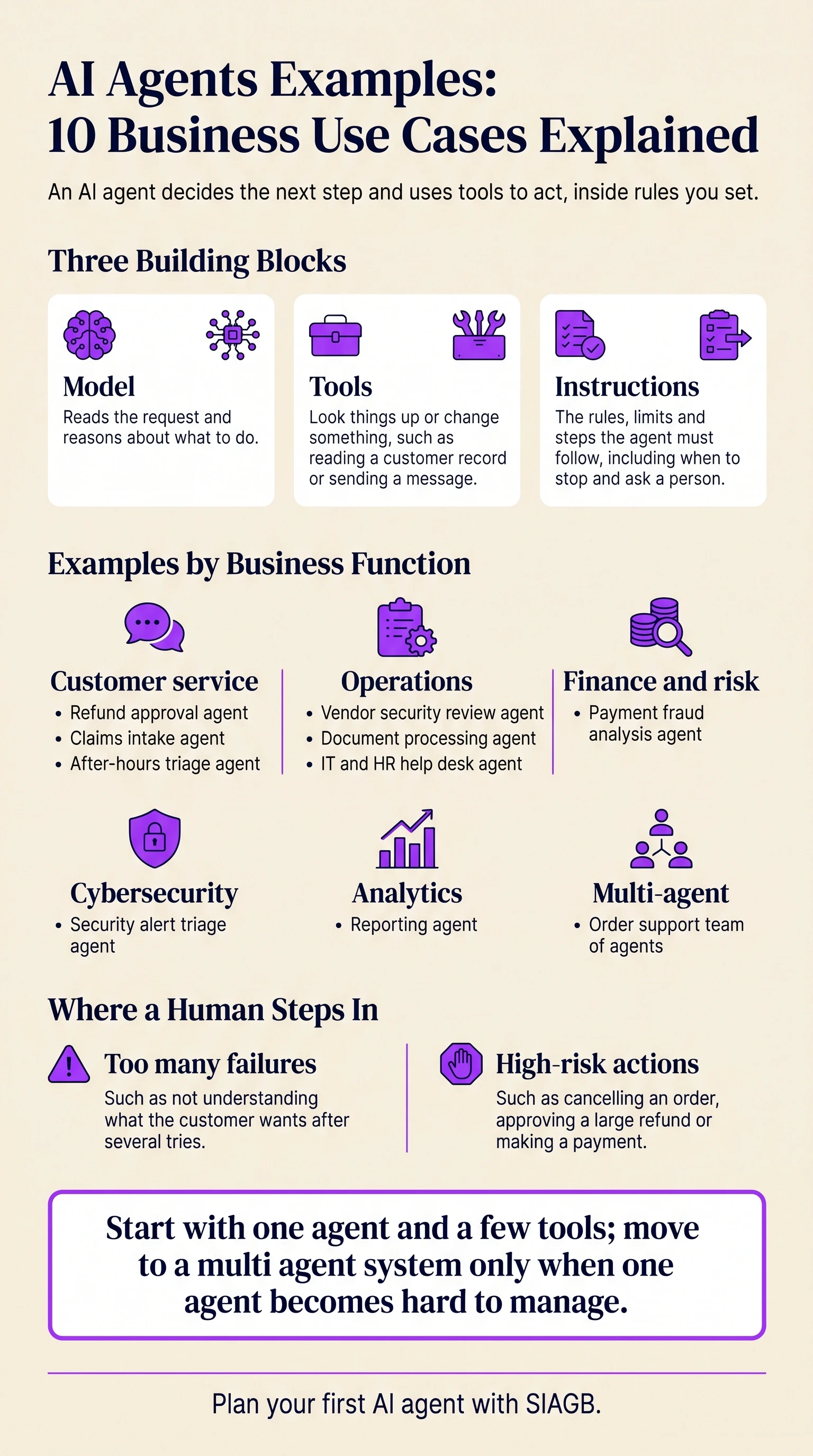
Underneath, most modern agents have three building blocks:
- A model. A language model that reads the request and reasons about what to do. Generative AI on its own produces text; inside an agent, the same large language models also choose actions.
- Tools. Connections that let the agent look things up or change something, such as reading a customer record or sending a message.
- Instructions. The rules, limits and steps the agent must follow, including when to stop and ask a person.
If any of those three is missing, you’ve probably got a chatbot or a script, not an agent.
AI Agent Examples at a Glance
The table below summarises the ten AI agent examples covered below. Each row is a general business scenario, not a named company. The tools column shows the kind of access the agent needs, and the last column shows where human intervention belongs.
| Business function | Example agent | What it does | Tools it uses | Where a human steps in |
|---|---|---|---|---|
| Customer service | Refund approval agent | Checks the order, policy and history, then approves or escalates | Order system, policy documents, refund action | Large refunds, unclear cases |
| Customer service | Claims intake agent | Reads the customer’s description and documents, fills the claim record | Claim form, document reader, customer record | Final claim decision |
| Customer service | After-hours triage agent | Answers order, delivery and returns questions, routes the rest | Knowledge base, order lookup, ticket system | Anything it cannot resolve |
| Operations | Vendor security review agent | Compares supplier answers and policies with your checklist | Document reader, checklist, report template | Sign-off on the supplier |
| Operations | Document processing agent | Matches invoices or contracts to orders and standard terms | Accounts system, file storage | Exceptions and approvals |
| Operations | IT and HR help desk agent | Answers staff questions, logs tickets, handles simple requests | Company knowledge, ticket system | Access changes, sensitive requests |
| Finance and risk | Payment fraud analysis agent | Reviews flagged payments in context and explains the concern | Transaction data, customer history | Blocking or reversing a payment |
| Cybersecurity | Security alert triage agent | Groups related alerts, gathers context, drafts a priority | Security logs, alert queue | Containment actions |
| Analytics | Reporting agent | Pulls figures, explains changes, flags anomalies | Approved data sources, dashboards | Checking numbers before decisions |
| Multi-agent | Order support team of agents | A triage agent routes work to order, returns and technical agents | Handoffs between agents, all of the above | Escalations from any agent |
Customer Service AI Agent Examples: Refunds, Claims and After-Hours Enquiries

Customer service is where most businesses meet AI agents first, and honestly, that makes sense. The tasks repeat, the requests arrive in plain language, and the rules have exceptions that a fixed script handles badly.
1. Refund approval agent
A customer writes in asking for a refund. The agent reads the message, finds the order, checks the refund policy and the customer’s history, and decides. If the request is small and clearly inside policy, it approves the refund through an approved action. If not, it writes a short summary and passes the case to a human agent. OpenAI names refund approval as a typical case of the complex decision-making that suits an agent. That’s because each request turns on context and exceptions.
2. Claims intake agent
For an insurer, a repairer or any business that handles claims, the slow part is often turning a customer’s story into a complete record. A claims intake agent reads the description, any attached documents and photos, fills in the claim fields and asks the customer for anything missing. OpenAI uses processing a home insurance claim as its example of work that relies heavily on unstructured data. The agent doesn’t make the final claim decision, though. It prepares the file so a person can decide faster.
3. After-hours triage agent
Outside business hours, an agent can answer the common questions about delivery times, order status and returns, then route anything else to the right team for the morning. This is the specific task many businesses first ask an AI assistant to do. Microsoft’s documentation describes contact centre agents built this way. A primary agent works with specialised sub-agents, and the case goes to a human when the agent can’t resolve it. When we scope one of these, we start by asking where customers get stuck after hours, because that’s usually where the first agent earns its keep. If you’re planning something similar, our AI chatbots and agents service covers how we set this up for Australian businesses.
Where a human steps in
All three examples rely on external tools, so they also need clear limits. OpenAI’s guide names two primary triggers for human intervention. The first is too many failures, such as not understanding what the customer wants after several tries. The second is a high-risk action, such as cancelling an order, approving a large refund or making a payment. Older virtual assistants only answered questions. But these agents can act. So the handover point has to be planned, not left to chance. In our builds, we check that the person who picks up an escalated case gets the full context, so the customer isn’t asked to repeat the whole story.
Operations and Back-Office Examples: Agentic Workflows That Save Staff Time

Back-office work is full of tasks that are too varied for simple automation and too dull for skilled staff. Which is frustrating for the people stuck doing it. An agentic workflow puts an agent at the steps that need reading and judgement, and keeps fixed steps fixed.
4. Vendor security review agent
Before you sign with a new supplier, someone has to read its security questionnaire, policies and certificates and check them against your requirements. The rules for this are long, and they usually change more often than anyone would like. OpenAI gives vendor security reviews as its example of a system made unwieldy by extensive and intricate rules. A review agent reads the supplier’s documents, maps each answer to your checklist, highlights gaps and drafts findings. A person reviews the draft and signs off.
5. Document processing agent
Accounts payable and contract review follow the same pattern. The agent reads an invoice or contract, matches it to the purchase order or your standard terms, and flags anything that doesn’t line up: a different price, a missing clause, a changed payment term. Microsoft’s Copilot Studio documentation names accounts payable, contract review and hiring as complex workflows its reasoning agents are built for. It says those agents can create, edit and reason over Word, Excel, PowerPoint and PDF files.
6. IT and HR help desk agent
Staff ask the same questions every week: how to reset a password, where the leave policy is, how to request new software. A help desk agent answers from your company knowledge, logs a ticket when it can’t help, and handles simple requests through approved tools. Anything involving access rights or personal circumstances goes to a person.
The tools behind these agents
OpenAI groups the tools an agent uses into three types. Data tools let it retrieve context, such as querying a CRM or reading a PDF. Action tools let it change something, such as updating a record or sending a message. Orchestration tools are other agents it can call. Most back-office agents need the first two, connected to the systems you already run. Microsoft’s Copilot Studio documentation says its agents reach those systems through connectors, REST APIs and MCP servers. In practice, that connection work tends to be the bigger part of the project, and our AI integration service is where we handle it. The aim is an AI workflow that takes complex tasks off people’s desks while keeping every action traceable.
Finance, Risk and Cybersecurity AI Agent Examples
Finance and security teams deal with high volumes, high stakes and patterns that are hard to write down as rules. That makes them good ground for agents, and also places where human oversight matters most.
7. Payment fraud analysis agent
This is OpenAI’s own headline AI agent example. It explains that a traditional rules engine works like a checklist and flags payments that match set criteria. An agent works more like a seasoned investigator. It weighs context and subtle patterns, even when no clear rule is broken. In practice the agent reviews flagged payments, pulls the customer’s history, writes a short explanation of why a payment looks wrong and recommends an action. A person decides whether to block or reverse it. For the wider question of how agents compare with rule-based systems, see how AI agents are replacing traditional automation.
8. Security alert triage agent
Security tools produce more alerts than a small team can read. A triage agent groups related alerts, gathers context from logs, and drafts a summary with a suggested priority for the analyst. It shouldn’t lock accounts or change firewall rules on its own. And there’s an awkward twist here: cybersecurity agents face their own risk. The Australian Cyber Security Centre lists prompt injection, where hidden instructions in an input trick the AI, among the risks of AI tools. It advises businesses to verify AI outputs and keep human oversight for important decisions.
9. Reporting and analytics agent
A reporting agent pulls figures from approved data sources, explains in plain words what changed since last month, and flags anomalies worth a look. The value is faster insight. But the numbers still need checking. Treat the agent’s analytics as a strong first draft, and keep a person responsible for any decision made from them.
What Does a Multi Agent System Look Like in Practice?
A multi agent system splits one job across multiple agents, each with a narrow role. OpenAI describes two common patterns. In the manager pattern, a central agent coordinates multiple specialised agents through tool calls, each handling a specific task or domain. In the decentralised pattern, agents work as peers and hand off tasks to one another based on their specialisations. Orchestration is the word for this coordination.
10. Order support team of agents
Picture an online retailer’s support desk:
- A triage agent reads each incoming message and works out what it is about.
- An order agent handles delivery and order status questions.
- A returns and refunds agent checks the policy and starts approved refunds.
- A technical support agent helps with product set-up problems.
- A human queue takes anything an agent escalates.
OpenAI’s guide uses almost exactly this example: a triage agent recognises that a message concerns a recent purchase and hands it to an order management agent. Microsoft’s documentation also describes agents that hand off to other agents and call workflows.
Multi agent systems aren’t the place to start, though. OpenAI’s advice is to get the most out of a single agent first and add tools one at a time. Split into specialised agents only when the logic or the number of tools gets hard to manage. Agentic AI systems with many moving parts are harder to test, and every handoff is another place for a request to go wrong. For most small and mid-sized businesses, one well-built agent with a few tools covers the first year of work. We’d rather see one agent done properly than five half-tested ones.
What Are the Five Types of AI Agents, With an Example of Each?
Long before large language models, computer science described five classic types of agent. They still help explain how today’s AI systems decide what to do. The examples below are everyday ones.
Simple reflex agents
A simple reflex agent reacts to what it senses right now, using if-this-then-that rules. It has no memory. A thermostat that switches the heating on below a set temperature is a reflex agent. So is an email rule that sends an automatic reply whenever a message contains a certain word. Simple reflex agents are fast and predictable, but they fail when the situation isn’t covered by a rule.
Model based reflex agents
A model based reflex agent keeps an internal picture of the parts of the world it cannot see at that moment. A robot vacuum that remembers which rooms it has already cleaned and where the furniture is works this way. Each model based reflex agent still reacts with rules, but it uses its stored picture to choose the right one.
Goal based agents
Goal based agents plan a series of steps toward a goal. A navigation app working out a route to an address is the classic example: it compares possible paths and picks one that gets you there. Many business agents behave this way, breaking a request like “process this claim” into steps.
Utility based agents
Utility based agents go further and weigh trade-offs to choose the best option, not just any option that reaches the goal. A travel booking tool that balances price, travel time and number of stops is a good example. In business, an agent that schedules deliveries to balance cost, speed and driver hours is utility based.
Learning agents
A learning agent improves from feedback. A spam filter that gets better as people mark messages as junk is a familiar learning agent. In business, learning agents improve through feedback loops, such as reviewers correcting the agent’s drafts.
Today’s business agents mix these types. Most act like goal based or utility based agents, with a learning loop around them and a few hard reflex rules for safety, such as “never issue a refund above this amount”.
Is ChatGPT or Google Assistant an AI Agent?
It depends on what the tool is set up to do. According to OpenAI’s guide, some apps use a language model but don’t let it control how the work runs. Simple chatbots, single-turn prompts and sentiment classifiers are examples, and they aren’t agents.
So an AI assistant that only answers questions in a chat window behaves more like a chatbot. Voice and virtual assistants that set a timer or play a song are mostly following fixed commands. Now give the same assistant tools and let it carry out a multi-step task for you, such as looking something up, filling in a form and sending the result. At that point it starts to behave as an agent.
The label matters less than the behaviour. Here’s a quick test with three questions: does it decide the next step itself, can it use tools to act in other systems, and does it know when to stop and hand back to a person? If the answer to all three is yes, you’re looking at an agent. For a fuller comparison, read our guide to AI agents and chatbots.
Which Business Tasks Suit an AI Agent?
Not every task needs an agent, and that’s fine. OpenAI’s guide sets out three signs that a workflow suits an agent. The first is complex decisions with judgement and exceptions. The second is rules that have become hard to maintain. The third is heavy reliance on unstructured data, such as documents and conversations. If a task doesn’t clearly meet these criteria, the guide says, a deterministic solution may suffice.
A quick test for any task on your list:
- Does it need judgement? Refund approvals and fraud reviews do. Copying a total from one field to another doesn’t.
- Does it involve messy text or documents? Emails, claims, contracts and supplier answers point toward an agent.
- Do the rules keep changing? If your team updates the checklist every month, an agent that reads the current policy may be easier to maintain than a script.
- Can the risky actions be gated? If you can’t put a human approval in front of the expensive or irreversible steps, the task isn’t ready for an agent.
Tasks with fixed, predictable steps, such as sending a receipt after payment, are usually better handled by plain automation. For examples from specific sectors, see agentic AI in marketing, healthcare and retail.
How Are Australian Businesses Using AI Agents, and What Guidance Applies?
AI agents reach Australian businesses in two main ways: as features inside software they already use, or as custom agents connected to their own systems. The Australian Cyber Security Centre’s guidance on artificial intelligence for small business notes that more small businesses are using AI through applications, websites and enterprise systems hosted in the public cloud. It says AI tools can help small businesses automate tasks and improve customer experience, but they can also bring data leaks, privacy breaches, unreliable outputs and supply chain weaknesses. It also warns that some AI providers may use the data customers submit to train their models, depending on settings or plan. Its advice is to review a vendor’s privacy, security and data handling before you sign up. That point about training data is easy to miss, so check which plan you’re actually on.
Several pieces of government guidance apply:
- Voluntary AI Safety Standard. The standard sets out 10 guardrails. Guardrail 5 asks organisations to enable human control or intervention to achieve meaningful human oversight across the AI system’s life cycle. The department also publishes fictional worked examples. One is a fast-growing consumer business with 50 employees that wants a chatbot on its website ahead of a product launch, and it shows how the guardrails change the way such a project is run.
- Guidance for AI Adoption. The National AI Centre’s implementation practices set out 6 essential practices. They are: decide who is accountable, understand impacts and plan accordingly, measure and manage risks, share essential information, test and monitor, and maintain human control. According to business.gov.au, the guidance includes a Foundations version for businesses new to AI, plus templates for an AI policy and an AI register.
- Privacy. The OAIC’s guidance on commercially available AI products says privacy obligations apply to any personal information put into an AI system. They also apply to outputs that contain personal information. As best practice, it recommends that you don’t enter personal or sensitive information into public generative AI tools. It also says public-facing AI tools, such as chatbots, should be clearly identified.
For an agent, these points become concrete design choices: who owns the agent, which data it may read, which actions need a person’s approval, and how customers know they’re dealing with AI. This is general information, not legal advice.
How to Pick Your First AI Agent: Custom AI Agent or Platform?
A good first agent is narrow, frequent and easy to check. When we run discovery with a business, we ask two questions first: where does the team spend the most time on repetitive work, and where do customers get stuck? Then use this plan:
- Pick one task. Choose something your team does many times a week that meets the three signs above. Refund requests, supplier document checks and after-hours enquiries are common starting points.
- Write the job description. List what the agent may do on its own, what it may only suggest, and what it must never do.
- Choose platform or custom. If the task lives inside software you already use, try the agent features on those platforms first. A custom AI agent makes sense when the task crosses several of your own systems, needs your own data or follows rules no platform supports.
- Rate every tool. OpenAI suggests giving each tool a low, medium or high risk rating. The rating rests on factors such as read-only or write access, reversibility, account permissions and financial impact. High-risk actions then pause for checks or go to a person.
- Check privacy and the vendor. Before any personal information goes in, apply the OAIC guidance and the ACSC vendor checks above.
- Run a small trial. Start with a limited group of cases, compare the agent’s work with your team’s, fix the instructions, then widen the scope.
Keep human oversight strongest at the start. It’s tempting to hand over more once the first few cases go well. Don’t, or at least not all at once. As the agent proves reliable on a task, you can move some steps from “suggest” to “do”, one at a time.
Key Takeaways
- An AI agent decides the next step and uses tools to act, inside rules you set; a chatbot that only answers questions is not an agent.
- The clearest business examples are refund approval, claims intake, vendor security reviews, document processing and payment fraud analysis.
- Start with one agent and a few tools; move to a multi agent system only when one agent becomes hard to manage.
- The five classic types (simple reflex, model based reflex, goal based, utility based and learning agents) still describe how agents make decisions.
- In Australia, plan for human oversight before any personal data reaches an agent. Use the Voluntary AI Safety Standard, the Guidance for AI Adoption and the OAIC privacy guidance.
FAQ
What are some real examples of AI agents in business?
Common examples include an agent that checks an order and approves or escalates a refund, and one that reads a customer’s claim and fills in the record. Others compare supplier documents against a security checklist or investigate a suspicious payment. In each case the agent reads information, decides the next step and uses approved tools, while a person handles the high-risk calls.
How much human oversight does an AI agent need?
More at the start, and always for actions that are sensitive, irreversible or costly. A practical rule is to let the agent handle read-only and low-risk steps on its own. It should ask for a person’s approval before anything like a large refund, a payment or a cancelled order. And it should hand the case to a person when it can’t understand a request after a few attempts.
Can a small business use AI agents without a development team?
Often, yes. Many business platforms now include agent features that you set up with instructions, knowledge sources and connectors rather than code. That suits tasks that live inside software you already use. A custom build makes more sense when the agent has to work across your own systems, data or business rules.
Do AI agents replace staff?
In most of the examples here, the agent takes the repetitive part of a task, such as reading documents, gathering context or drafting a first answer. A person keeps the judgement calls and the exceptions. The goal is to free staff for complex work, not to remove the people who are accountable for the outcome.
What is the difference between an AI agent and an agentic workflow?
An agentic workflow is a business process in which one or more steps are handled by an AI agent that decides what to do next. The agent is the decision-maker inside that process. A workflow can mix fixed steps, such as sending a confirmation email, with agent steps, such as reading a messy customer request and choosing how to handle it.
Sources
- OpenAI, A practical guide to building agents.
- Microsoft Learn, Agents overview (Microsoft Copilot Studio).
- Department of Industry, Science and Resources, Voluntary AI Safety Standard: the 10 guardrails.
- Department of Industry, Science and Resources, Voluntary AI Safety Standard: applying the standard through examples.
- National AI Centre, Guidance for AI adoption: implementation practices.
- business.gov.au, New guidance helps Australian businesses adopt AI safely and responsibly.
- OAIC, Guidance on privacy and the use of commercially available AI products.
- Australian Cyber Security Centre, Artificial intelligence for small business.

Ready to put this into practice?
Let's Talk