
Healthcare website accessibility means building a clinic site that anyone can actually use, then keeping it that way. It matters more here than in most sectors, because a broken booking form doesn’t just annoy someone, it delays care. Here’s how we audit these sites, what we find, what to fix first, and how to stop the work unravelling six months later.
Why Does Accessibility Hit Healthcare Harder?
A retail site that fails is a lost sale. A clinic site that fails can mean a missed appointment, a wrong dose, or a patient who gives up and calls nobody. That gap between digital accessibility in retail and in the healthcare sector is the whole reason this work gets treated differently.
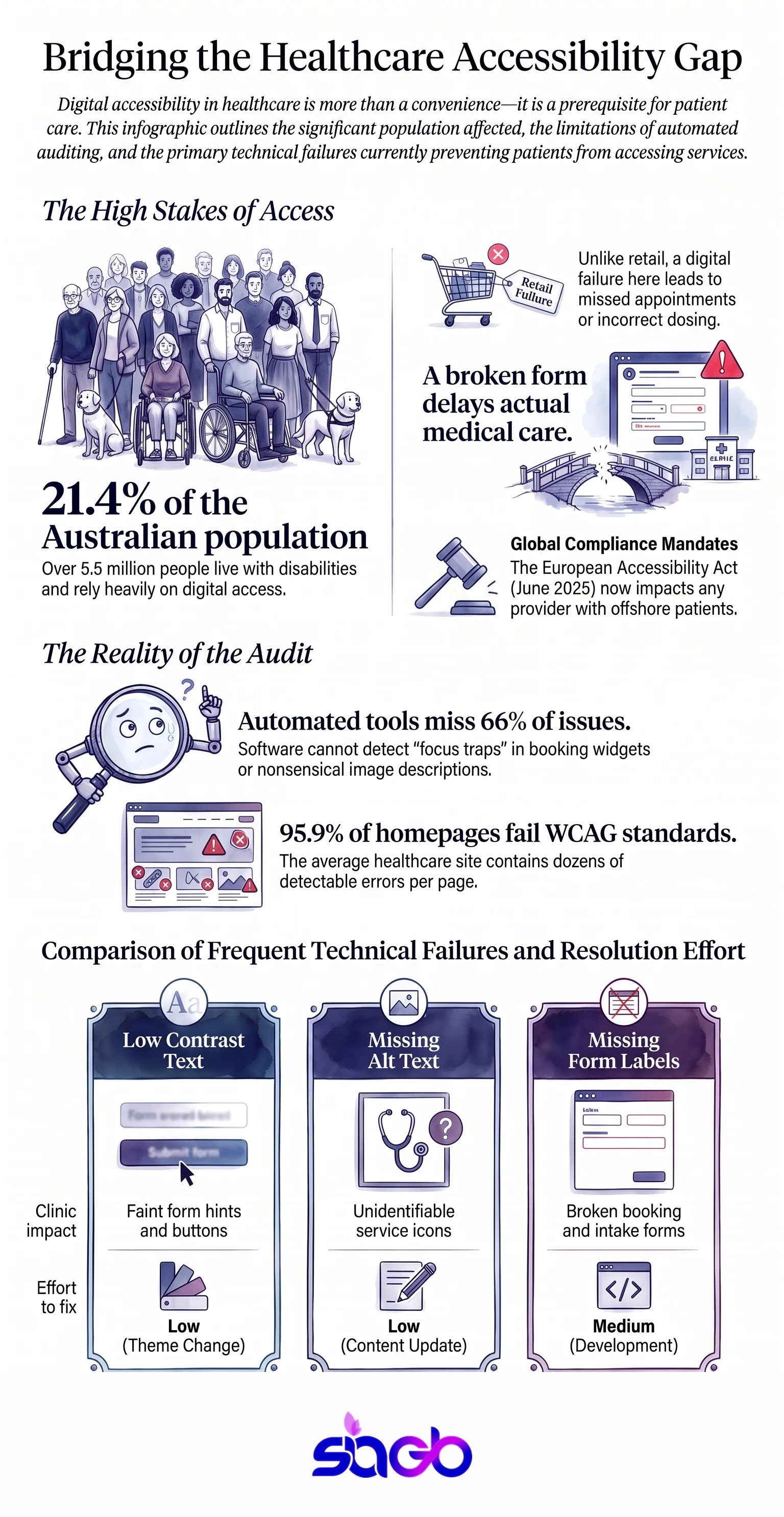
The audience skews too. About 1.3 billion people, roughly 16 percent of the world, live with a significant disability according to the World Health Organization. In Australia, ABS data puts it at 5.5 million people, or 21.4 percent. Those patients use your site more than average, not less, because getting to a clinic in person is harder for them.
Add ageing. Vision, hearing and dexterity all decline with age, and older patients are your heaviest users of health information. Accessibility work quietly serves them all, and it lifts the digital experience for every user on a slow phone in a waiting room.
One more group to keep in view: healthcare organisations that serve patients abroad. The European Accessibility Act has applied since June 2025, so a telehealth service reaching EU patients now carries accessibility compliance duties there as well as at home. Australian healthcare providers with an offshore patient base run into this more often than they expect.
What Does an Accessibility Audit Actually Involve?
Most healthcare websites have been through a free scanner once. Someone saw a score, filed it, and moved on. That’s not an audit.
Digital accessibility work starts with an honest audit, and a real audit has three layers:
- Automated scans on every template, not just the homepage. Tools like WAVE and axe find code level faults fast.
- Hand testing of real tasks. Book an appointment with a keyboard alone. Read a result with a screen reader on. Fill the contact form with the mouse unplugged.
- Document review. PDFs, forms and any page on the website you inherited from an older build.
Automated tools catch perhaps a third of the accessibility issues on a site. They can tell you an image has no alt text. They can’t tell you the alt text says “IMG_4471” or that your booking widget traps focus on step three. That judgement still needs a person, ideally an accessibility expert who has watched real users struggle.
We work page by page rather than by sample. On a 37 page medical site, we found 213 WAVE errors and an average AIM score of 4.1 out of 10, with no page meeting Level AA. Sampling five pages would have missed most of the accessibility barriers. Details are in our ADA compliance case study.
Which Faults Show Up Most on Clinic Sites?
The same handful, over and over. WebAIM tested a million home pages in 2024 and found detectable WCAG failures on 95.9 percent of them, at an average of 56.8 errors per page.
| Fault type | Home pages affected, 2024 | Where it bites in a clinic | Fix effort |
|---|---|---|---|
| Low contrast text | 81.0 percent | Grey body copy, faint form hints, disabled buttons | Low, a theme change |
| Missing image alt text | 54.5 percent | Provider portraits, service icons, clinic photos | Low, a content job |
| Missing form input labels | 48.6 percent | Booking, contact and intake forms | Medium, needs a developer |
| Empty links | 44.6 percent | Phone and social icons with no text | Low, add aria-labels |
| Empty buttons | 28.2 percent | Menu toggles, carousel and modal controls | Medium |
| Missing document language | 17.1 percent | Every page, one line in the template | Very low |
Look at the fix effort column. Most of that list is cheap. What makes it expensive is leaving it until a complaint arrives, when the same work happens under a deadline set by someone else. Accessibility standards from the World Wide Web Consortium haven’t changed much since 2018, so nothing here is a moving target.
Fixing the Patient Portal Without Breaking Privacy

Portals carry the highest stakes on both sides. They hold health information, and they hold the tasks a patient most needs to finish.
Test the whole chain, not the login page. Sign in, book, upload a document, read a result, send a message. Each step needs a visible focus outline, a labelled field, and an error message that says what to do next. Digital accessibility is judged on finished tasks, not on a homepage score.
Then be careful with tooling. Any script you add to a portal touches sensitive data, which brings in HIPAA in the United States and the Privacy Act 1988 in Australia. Accessibility laws and privacy laws pull in the same direction more often than people assume. Accessibility overlays are the usual mistake here: an outside script, loaded next to clinical data, patching code it can’t see. Screen reader users frequently report that overlays make pages worse, not better.
Do the repair work in the markup. Add a widget afterwards if patients genuinely want font and contrast controls.
Redesigns: the Moment Accessibility Is Won or Lost
Most weak healthcare websites weren’t built badly on purpose. They aged. Templates, plugins and digital content piled up over eight years, and nobody re-tested.
A rebuild is the cheapest time to fix all of it, on one condition: web accessibility goes into the brief, not the snag list. Write the acceptance criteria before design starts, alongside the content plan and the list of digital services the website has to carry. WCAG 2.1 Level AA, keyboard tested, screen reader tested on the five core flows, contrast checked at 4.5 to 1 for body text.
Watch the integrations. Booking engines, EHR portals, chat tools and recall systems usually come from vendors, and you inherit their faults along with their accessibility features. Ask for a conformance report before you sign, not after. A healthcare website built this way costs about the same, ages far better, and gives every user a steadier experience.
Keeping It Fixed: Governance and AI Monitoring
Here’s the part almost everyone skips. Web accessibility decays. Someone uploads a PDF, a plugin updates, a new provider photo goes up without alt text, and last year’s clean audit stops being true. An accessible website is a habit, not a project.
Ongoing work looks like this:
- A named owner inside the healthcare organisation, not at the agency.
- Automated scans on a schedule, with results going to that owner.
- A publishing checklist so alt text and headings are set before any digital content goes live, backed by short accessibility training for whoever posts it.
- An accessibility statement with a contact route and the date of your last review.
- A quarterly hand test of the booking flow, because that’s the one that costs a healthcare provider money.
AI agents make the web accessibility scanning part cheap now. They can crawl every page nightly, flag new contrast failures or missing labels, and open a ticket without anyone remembering to run a report. It’s the same monitoring logic we use for AI chat and agent workflows, pointed at compliance instead of conversations. Machines handle the sweep, people handle the judgement calls, and the user experience stops sliding between redesigns.
Our ADA and AHRC compliance service runs on that model: fix the site once, then monitor so it stays fixed.
How Accessibility Feeds SEO and AI Answers

Crawlers and language models parse a website much like assistive technology does. They follow headings, read link text, and look for structure in the content.
So accessible websites tend to perform better in search and in AI answers. Descriptive headings give a model a clean chunk to quote. Real link text tells a crawler where a page goes. Labelled tables survive extraction, which matters for the healthcare information patients search for most. That’s the mechanism behind answer engine optimisation, and it starts with the same markup accessibility asks for.
The inverse hurts. A booking flow built from unlabelled divs is invisible to a screen reader and thin to a crawler at the same time, so the healthcare services behind it stay unfindable.
Which Rules Apply to Your Practice?
That depends on where you operate, and the two systems differ more than people expect.
US healthcare providers work under the ADA, plus newer federal rules from 2024 that name WCAG 2.1 Level AA with deadlines in 2026 and 2027. We cover that in ADA compliance for medical websites.
Australian healthcare providers answer to the Disability Discrimination Act 1992 and the Australian Human Rights Commission, with a complaint and conciliation path rather than a lawsuit. That’s covered in ADA compliance for medical websites in Australia.
Build the website to WCAG 2.1 Level AA and you satisfy both, which is why we treat the standard as the target rather than the law. Digital accessibility rules keep shifting; the technical bar has been stable for years.
Infographic: Healthcare Website Accessibility Framework
This framework shows the full loop for accessible medical sites: audit every template, fix by priority, prove it with before and after evidence, then monitor so new content can’t undo the work.
Infographic: Auditing Healthcare Website Accessibility
Frequently Asked Questions
What is healthcare website accessibility?
It’s the practice of building and maintaining a medical site so any user can finish a task on it, including people using a screen reader, people who can’t use a mouse, and older patients with low vision.
How do I audit a medical website for accessibility?
Scan every template with a tool like WAVE or axe, then test real tasks by hand. Book with a keyboard alone. Read a result with a screen reader. Hand testing finds what scanners miss.
How often should a clinic re-check accessibility?
Quarterly for a full sweep, plus a check on anything new you publish or install. Accessibility drifts as content changes, so monitoring costs far less than a rebuild.
Do accessibility overlays and widgets work?
Not as a fix. Overlays sit on top of the code and guess at meaning, and screen reader users often find them worse. Repair the markup first, then treat a widget as a comfort layer.
Does accessibility work help SEO and AI search?
Yes. Crawlers and AI models read structure the way assistive technology does, so headings, link text and alt text improve both access and visibility.
Key Takeaways for Practice Owners
- Audit every template on the site, not a sample. Scanners find about a third of the faults, so hand test the booking, login and contact flows.
- Six fault types cover most of the damage on a healthcare website, led by low contrast text at 81 percent of home pages and missing alt text at 54.5 percent.
- Portals need web accessibility and privacy planned together, and overlay scripts risk both.
- Put WCAG 2.1 Level AA into the redesign brief and ask vendors for conformance reports before you sign.
- Name an owner and monitor on a schedule, because content changes on healthcare websites are what undo a clean audit.
Sources
- WebAIM Million 2024 annual accessibility report - failure rates across one million home pages.
- World Health Organization disability fact sheet - 1.3 billion people, 16 percent of the world.
- ABS Survey of Disability, Ageing and Carers 2022 - 5.5 million Australians, 21.4 percent.
- W3C Web Content Accessibility Guidelines 2.1 - the Level AA success criteria.

Want to explore this further?
Book a Free Consultation