
A patient recall system is the process a practice uses to remind patients when they’re due back, for a check-up, a test result, a follow-up, or ongoing care. Done well, and especially when it’s automated, it cuts missed appointments, keeps existing patients coming back, and takes a repetitive job off your front desk. Done badly, or not at all, patients quietly drift away and you don’t notice until the schedule looks thin.
So let’s look at what a good recall system does, and what to look for if you’re choosing recall software.
What a patient recall system does
At its heart, patient recall is simple. You have patients who need to come back at some point, and you have a way of reaching out when that time arrives. The care itself decides the timing. The recall system just makes sure the reminder actually goes out.
There’s a difference between recall and ordinary appointment reminders, though, and it’s worth being clear on. Appointment reminders nudge someone about a booking they already have. Recall, sometimes sent as a recall letter or recall reminders, reaches out to patients who don’t have a booking yet but should. One reduces a missed appointment. The other brings people back for preventive care at all. A strong practice runs both as one reminder system.
And it’s not only about revenue. A good recall effort ties to real patient outcomes. Bringing someone back for preventative care, or to follow up a clinically significant result, is part of exceptional patient care, not just admin. That’s the bit worth holding onto: an automated recall system protects patient outcomes and builds patient loyalty at the same time. The recall reminders keep patients healthy and keep patient relationships strong. Miss a clinically significant result because the follow-up didn’t happen, and the clinical significance of that gap can be serious. So think of recall as care, delivered on time.
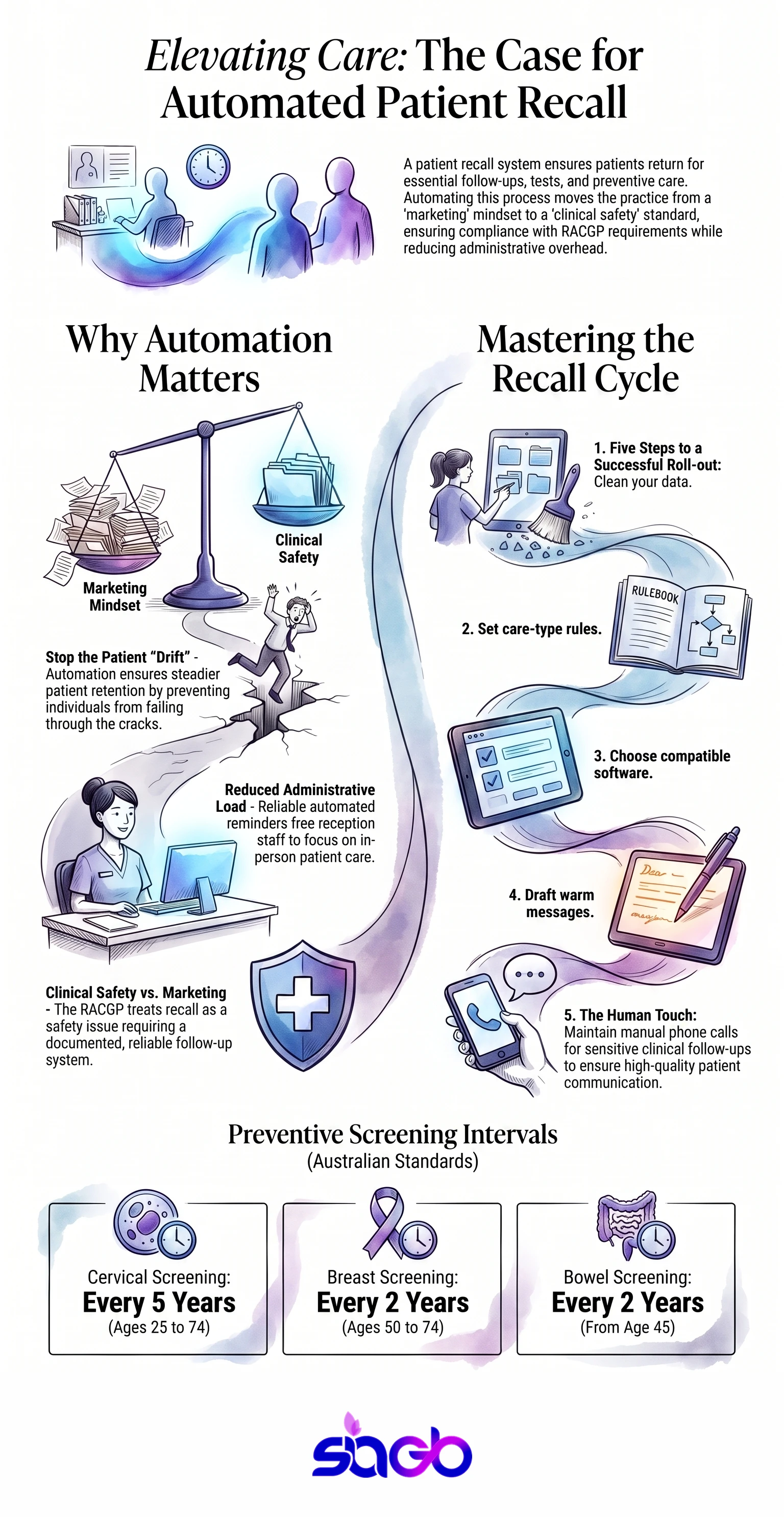
This is also why the Royal Australian College of General Practitioners treats recall as a safety issue rather than a marketing one. The RACGP Standards for general practices, now in their 5th edition since October 2017, expect a practice to have a documented system for following up results and for reminding patients about preventive care. An accreditation surveyor will ask to see it, and unfortunately a shared spreadsheet is a hard thing to show them.
And the quiet win here is patient retention. The economics are lopsided in an obvious way: attracting a new patient means advertising spend, a longer first appointment, and a full history workup, whereas keeping an existing one means a single SMS at the right moment. That’s one of the cheapest ways to hold onto the patients you already have.
Why automate it
You can run recall on paper. Plenty of practices still do, a diary, a spreadsheet, a sticky note that says “call Mrs Patel about her review.” It works until it doesn’t. Someone’s away, the list gets long, and the recalls slip.
Automated patient recall fixes that by doing the remembering for you. The system tracks who’s due, sends the recall message by SMS or email, and logs the response. Your team stops having to keep the whole list in their head.
Here’s what automated recall tends to improve:
- Fewer missed appointments, because reminders go out reliably.
- Better patient engagement, since messages arrive at the right time.
- Less admin load on reception, which frees them for actual patients.
- Steadier patient retention, because fewer patients fall through the cracks.
- Cleaner records, as every recall appointment and response is logged.
Now, a caution. Automation is only as good as your data. If your patient list is messy, automated recall just sends messages to the wrong people faster. Clean data first. Then automate. In our experience the first pass through a neglected patient list turns up duplicates, disconnected mobile numbers, and at least one patient recorded twice under a maiden name.
Manual recall vs automated recall
| Factor | Manual recall | Automated recall |
|---|---|---|
| Staff time | High, ongoing | Low, set and monitor |
| Reliability | Depends on the person | Consistent |
| Record keeping | Easy to miss | Logged automatically |
| Patient communication | One at a time | Scheduled, personalised |
| Scales with growth | Not really | Yes |
The table makes it look one-sided, and mostly it is. But manual recall does keep a human touch, and for some sensitive follow-ups, a real phone call beats an SMS. Good recall management blends the two: automate the routine, pick up the phone for the delicate ones.
How often should a recall go out?


This is where practices tie themselves in knots, so let’s make it simple. The clinical guideline sets the interval. The software just executes it. In Australia, several of those intervals are already decided for you by national programs, which makes them the easiest recalls to automate first.
The National Cervical Screening Program runs a 5-yearly HPV test for people aged 25 to 74, replacing the old 2-yearly Pap test back in December 2017. BreastScreen Australia invites women aged 50 to 74 for a free mammogram every 2 years. The National Bowel Cancer Screening Program posts a free kit every 2 years, historically to ages 50 to 74 and extended down to 45 from July 2024. For chronic conditions the clock runs faster: a type 2 diabetes review with an HbA1c typically sits at 3 to 6 months, and the Australian Immunisation Register has required reporting of National Immunisation Program vaccines since 1 July 2021.
| Care type | Typical interval | Who sets it |
|---|---|---|
| Cervical screening | 5 years, ages 25 to 74 | National Cervical Screening Program |
| Breast screening | 2 years, ages 50 to 74 | BreastScreen Australia |
| Bowel screening | 2 years, from age 45 | National Bowel Cancer Screening Program |
| Type 2 diabetes review | 3 to 6 months | RACGP clinical guidance |
| Childhood immunisation | Per schedule | Australian Immunisation Register |
Start with those. The Australian Government funds each of these programs through the Department of Health and Aged Care, so the intervals are clinically settled, patients already half expect the nudge, and you’re not inventing a practice policy from scratch. Anything outside a national program, such as a wound review or a post-operative check, is where your own recall rules earn their keep.
What to look for in recall software
If you’re weighing up patient recall software, keep the list short and practical. It should connect to your practice management system so you’re not double-entering data. It should send by the channels your patients actually use (SMS gets read, email sometimes doesn’t). It should let you set a recall strategy per condition or care type, since a diabetes review and a routine dental check don’t run on the same clock. And it should log every recall appointment and response so nothing gets lost.
Integration is the make-or-break item, and it’s worth naming the systems. Most Australian general practices run Best Practice, Medical Director, or Zedmed, whereas allied health and smaller clinics tend toward Cliniko or Halaxy. Check that your recall tool talks to yours directly, rather than through a nightly CSV export that somebody has to remember to run. If the connection needs building, that’s the sort of work our healthcare EHR integration team handles, and it’s usually cheaper than the workaround it replaces.
Australian practices have one more thing to check. According to the RACGP, practices should run recall and reminder systems that record and follow up important results properly. Whatever software you pick should support that, not fight it. Patient care and good records go together.
One more, easy to miss: the tone of the recall message itself. A cold, generic text gets ignored. A warm, clear message (“Hi, you’re due for your check-up, book here”) gets a response. Small thing. Big difference to patient satisfaction.
Rolling recall out in your practice
Alright, say you’re sold on the idea. How do you actually put a recall system in place without it turning into a headache? Here’s the order I’d follow.
Start with your data. Pull your patient list and see how clean it is. Wrong numbers, old emails, duplicates. Automated recall sends to whatever’s there, so bad data means messages going nowhere, or worse, to the wrong person. Fix this first. It’s the least glamorous step and the most important.
Next, decide what actually needs a recall. Not everything does. Map out your common care types and how often each one needs a follow-up. A chronic-condition review runs on a different clock than a routine check. Write those recall rules down before you automate anything.
Then pick the tool. Look for recall software that connects to your practice management system, sends by SMS and email, and logs every recall message and response. Don’t over-buy. A simple system you actually use beats a powerful one your team quietly ignores.
Now write your messages. Keep them short, warm, and clear. Tell the patient why they’re due and how to book. One link. One action. That’s it. A message that makes booking easy gets a response. One that’s cold or confusing gets ignored.
- Clean the patient data first.
- Set recall rules per care type.
- Choose software that fits your practice system.
- Write short, warm recall messages.
- Keep a human call for the sensitive follow-ups.
Then watch it for a month. See who responds and who doesn’t. Tweak the timing. Maybe a reminder three days out works better than one. Maybe some patients need two nudges, not one. Recall isn’t set-and-forget. It’s set, watch, and adjust.
One more thing that’s easy to overlook: tell your team what the system is doing. A recall tool works alongside your front desk, not instead of it. Reception still fields the replies, still books the appointments, still handles the patient who rings back confused. If they don’t know the automated messages are going out, you get crossed wires, two reminders for one person, or a staff member insisting they never sent anything. That’s a frustrating hour to spend on the phone. A five-minute briefing sorts it. Your whole team should know what the system sends, when, and what to do when a patient responds. Get that right and the whole thing runs smoothly. Give it a bit of attention early and it’ll quietly pay you back for years, in kept appointments, steadier patient retention, and a front desk that isn’t buried in phone calls.
Infographic: How Patient Recall Systems Cut Costs
FAQ
What’s the difference between recall and appointment reminders?
Appointment reminders are for bookings a patient already has. Recall reaches out to patients who are due for care but haven’t booked. Reminders cut no-shows; recall brings people back. You want both.
Does automated patient recall really reduce missed appointments?
Yes. Reliable, well-timed reminders mean fewer people simply forget, and that’s the main cause of missed appointments. The bigger win is patient retention, keeping existing patients engaged over time.
Will a recall system work with our practice software?
Good recall software connects directly to your practice management system, so patient data flows across without double entry. Check the integration with Best Practice, Medical Director, Zedmed, or Cliniko before you buy.
Is patient recall allowed under privacy rules?
Yes, when it’s part of the patient’s care and you handle their information properly. In Australia, follow RACGP guidance and the Privacy Act 1988; keep messages general and store data securely.
How often should recall intervals be set?
The clinical guideline sets the interval, not the software. Cervical screening runs on a 5-year cycle for ages 25 to 74, BreastScreen Australia and bowel screening run every 2 years, and a type 2 diabetes review typically runs every 3 to 6 months.
Key takeaways
A patient recall system reminds patients when they’re due back, and automating it means fewer missed appointments, less admin, and stronger patient retention. Automated recall handles the routine reliably, while a human call still suits sensitive follow-ups, so blend the two. When choosing recall software, look for practice-system integration, SMS and email, condition-based recall strategies, and clean logging that supports RACGP standards. And keep the recall message warm, because tone decides whether patients respond.
Thinking about automating recall in your practice? That’s the kind of workflow we help set up at SIAGB, from cleaning your patient data to picking the right software and writing messages that patients actually respond to. Our All Health Medical case study shows how recall sits alongside booking and the rest of a clinic’s healthcare website development.
Sources
- Royal Australian College of General Practitioners, Standards for general practices 5th edition, on recall and reminder systems.
- Australian Commission on Safety and Quality in Health Care patient communication guidance.
- Department of Health and Aged Care on the National Cervical Screening Program, BreastScreen Australia and the National Bowel Cancer Screening Program.
- Services Australia on Australian Immunisation Register reporting requirements.
Updated July 2026. Written by Sheetal Dhadial, founder of SIAGB, which builds patient engagement and recall workflows for clinics.

Ready to put this into practice?
Let's Talk