
Accounting software records, manages, and reports on money. Yet plenty of Australian businesses buy a capable platform and still get poor results. That usually happens because the system was chosen around a feature list rather than a real business problem.
Why Accounting Software Decisions Fail
Most businesses don’t struggle because of the product. They struggle because of how it was chosen and set up. I’ve watched a company spend 4 months migrating ledgers, then keep running the board pack out of a spreadsheet anyway. Sound familiar?
The usual issue is workflow mismatch. The software doesn’t reflect how the business really runs. Data entry feels awkward, reports don’t answer the questions leaders actually ask, and teams quietly stop trusting the numbers.
At SIAGB this comes up constantly in AI consulting work with retail groups and clinics. The fix isn’t more features. It’s a problem-first approach that starts with how money moves through the business, rather than which vendor has the nicer dashboard.
What Accounting Software Actually Does
Accounting software is a system that records, processes, and reports financial data. At a basic level it tracks income, expenses, assets, and liabilities. That’s the compliance layer, and in Australia it carries real obligations.
If your turnover passes AUD 75,000 you must register for GST and lodge a business activity statement, usually quarterly. If you employ anyone, payroll has to be reported to the ATO through Single Touch Payroll Phase 2 on or before each pay day. According to ATO record-keeping rules, most business records must be kept for 5 years. Your software either handles that quietly or it becomes someone’s weekend.
Modern platforms go further. They automate invoicing, payroll, bank reconciliation, and tax reporting, and connect to point of sale, billing, and inventory tools. The real goal is decision support. If a report doesn’t help you decide what to do next, the system isn’t finished.
The Business Problems It Should Solve
Three problems show up again and again, in businesses of every size.
- Poor cash flow visibility. Owners often learn their true position 3 or 4 weeks late, which makes planning guesswork.
- High manual workload. Finance teams lose hours each week to data entry, corrections, and reconciliations. It’s slow, and honestly it’s demoralising.
- Low trust in the numbers. When a report changes every time someone refreshes it, people stop opening it.
Here’s the thing. None of these get fixed by buying a bigger system. They get fixed by design choices, clear ownership, and automation applied where volume is high, instead of automation applied where it demos well.
Where Accounting Software Falls Short
The failure patterns are predictable, which is the good news.
A poorly designed chart of accounts limits reporting forever. If you track revenue by entity but not by site, you can’t answer “which clinic is profitable” without rebuilding history.
Disconnected systems create silos. Sales, payroll, and expenses don’t line up, so the totals stay out by a little every month. We compared point of sale totals against the ledger for one retail client and found a gap of roughly 2 percent every month, purely because refunds synced a day late.
Then there’s ownership. When one person owns data quality it slips during leave, and when a whole team owns it the slip is permanent. That’s true of AI systems too. Automation without governance just scales bad data faster.
Comparing Options by Business Stage

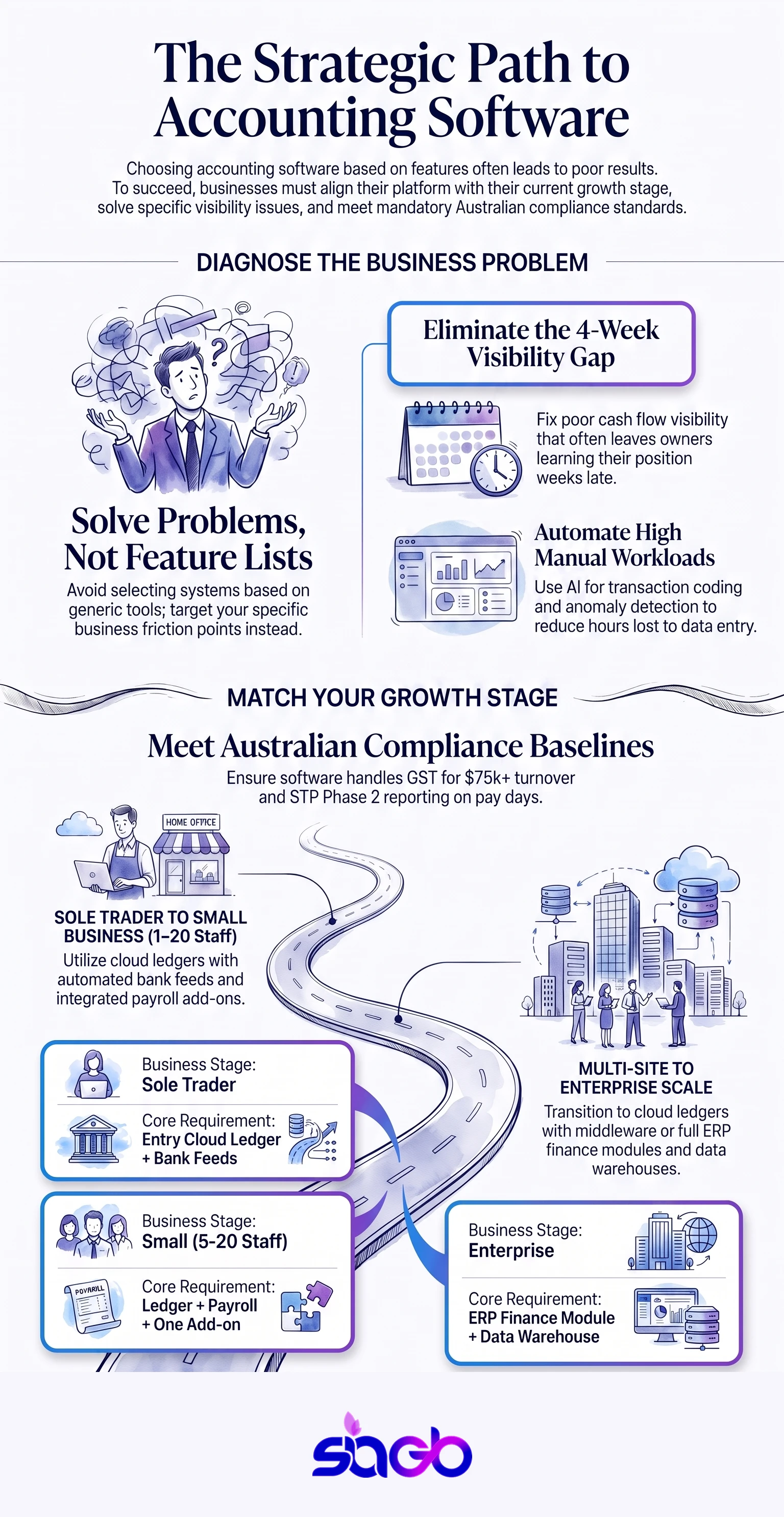
Vendor comparisons age badly, so compare by stage instead. The table below maps the four situations we see most often in Australia.
| Business stage | Monthly transactions | What usually fits | Where AI adds value first |
|---|---|---|---|
| Sole trader or micro | Under 200 | Entry cloud ledger with bank feeds and STP | Auto-coding bank transactions |
| Small business, 5 to 20 staff | 200 to 2,000 | Cloud ledger plus payroll and one add-on for stock or jobs | Anomaly flags on supplier invoices |
| Multi-site or clinic group | 2,000 to 10,000 | Cloud ledger with middleware to practice or POS systems | Cash flow forecasting across sites |
| Enterprise | Over 10,000 | ERP with a finance module and a data warehouse | Reconciliation matching and audit sampling |
Xero, MYOB, and QuickBooks Online cover most of the first three rows in the Australian market. The choice between them matters far less than whether your integrations are clean, so test the connectors before you sign anything.
Features That Actually Matter
Not every feature earns its place. Some look impressive in a demo and go untouched after week 2.
Real-time reporting is the one that changes behaviour. Leaders need cash, margin, and trend visible now rather than next month.
Automation matters where volume is high. Invoicing, payroll, and bank reconciliation should need very little human touch. Everything else can wait.
Integrations are the quiet hero. Strong links to CRM, inventory, billing, and banking cut errors and rework. Integration quality usually beats brand name, in the same way a clean data source beats a clever model.
A Problem-First Framework for Choosing
Start with outcomes, not feature lists.
- Write down the decisions you need to make, such as cash planning, hiring, pricing, or opening a second site.
- Map current workflows honestly, including the workarounds, spreadsheets, and manual checks that stay out of the meeting notes.
- Assess scale. Ask whether the setup still works at double the transaction volume or with 3 more locations.
- Test the integrations with your real data, not the vendor’s sample file.
That order mirrors how we approach AI strategy work. Define the decision, then design the system. Businesses that skip step 2 usually pay for it during implementation.
Accounting Software for Healthcare and Regulated Industries

Clinics and other regulated operators carry extra weight. Audit trails matter, so you need clear records of changes, approvals, and access. Access controls matter too, because reception staff have no reason to see payroll or patient-linked billing.
Integration is where it gets genuinely hard. Accounting software has to line up with practice management, billing, and scheduling, and those systems rarely share an identifier. For groups running multiple sites, that mapping work is usually the difference between a 6-week and a 6-month rollout.
Financial data still underpins the growth decisions, including what you spend on marketing. We see this constantly in AI consulting for Sydney healthcare providers, where marketing budget arguments are really data quality arguments in disguise.
Compliance, Security, and Data Governance
Cloud doesn’t mean secure by default. That assumption causes real damage.
Strong systems control who can reach data, what they can change, and when. Logging and alerting do the rest. According to the OAIC’s Notifiable Data Breaches reporting, health service providers are consistently among the top-reporting sectors, and compromised credentials and human error remain leading causes. Neither of those is a software problem you can buy your way out of.
Australian Privacy Principles apply here, and they cover data location, retention, and breach response. Decide all three before go-live rather than during an incident. HIPAA is a United States framework, so it doesn’t bind an Australian clinic, though the underlying control set translates well.
Using AI to Extend Accounting Software Value
AI adds value when the foundations are solid. When they aren’t, it makes the mess faster.
Transaction categorisation is the obvious first win. A model that codes 80 percent of bank lines correctly turns reconciliation from a task into a review. Anomaly detection is the second, flagging a duplicate supplier invoice before it gets paid rather than 60 days after.
Forecasting is where it gets interesting. Analytics layers can project cash across sites and show which assumption drives the result, which is far more useful than a single number. That’s the same thinking behind our data analytics work. Systems should hand each other clean data instead of sitting in silos.
One caution. Every model needs a human check on anything that touches a lodgement or a payment. Speed is not worth an amended BAS.
Implementation Challenges in the Real World
Implementation is where most of the value leaks out.
Change management gets underestimated every time. People resist a new process even when it’s better, particularly if the old one made them look good.
Legacy data is messy. Importing bad data just produces bad reports faster, so budget real time for cleansing rather than a token week.
Optimisation doesn’t stop at go-live either. Expect 3 to 6 months of tuning, training, and feedback. That’s normal, and planning for it beats being surprised by it.
Measuring ROI After Implementation
Measure outcomes, not opinions.
- Track hours saved on reconciliation and month-end close.
- Measure decision speed, such as how quickly a report lands and how many meetings it takes to explain.
- Watch compliance costs, including corrections, amended lodgements, and audit time.
Unfortunately most teams skip the baseline before the project starts, which leaves the payback argument unwinnable later. Spend an afternoon capturing the current numbers first.
Infographic: Choosing Accounting Software: Key Decision Points
Frequently Asked Questions
What is accounting software used for?
It records, processes, and reports financial data. In Australia that includes GST and BAS preparation, Single Touch Payroll reporting, and keeping records for 5 years.
How do I choose the right accounting software for my business?
Start with the decisions you need to make, then map how money moves today. Check volume, integrations, and reporting against that, rather than against a feature grid.
Is cloud accounting software secure?
It can be, but the vendor covers only part of it. Access control, offboarding, and logging stay with you, and those are where most incidents start.
Can accounting software integrate with other systems?
Yes, with payroll, banking, CRM, point of sale, and practice management tools. Test integration quality with real data before committing.
How long does it take to see ROI from accounting software?
Most businesses see a return in 6 to 12 months. Hours saved, faster close, and fewer corrections drive it.
Key Takeaways and Final Thoughts
Accounting software succeeds or fails on setup, not brand. That’s the uncomfortable part.
- Choose around the decisions you need to make, not the feature list.
- Get the chart of accounts right early, because it constrains every report you’ll ever run.
- Treat ATO obligations such as GST, BAS, and Single Touch Payroll as design inputs.
- Add AI where volume is high and the data is clean, then keep a human on anything that gets lodged or paid.
A problem-first approach leads to better design, faster adoption, and clearer ROI. AI and automation amplify whatever is already there, for better or worse.
If you want accounting software to support growth, treat it as a business system rather than finance tooling. That’s the approach we apply at SIAGB, and it holds up.
Sources
- ATO, Single Touch Payroll Phase 2: https://www.ato.gov.au
- ATO, GST registration and BAS: https://www.ato.gov.au/business
- OAIC, Notifiable Data Breaches reports: https://www.oaic.gov.au
- OAIC, Australian Privacy Principles: https://www.oaic.gov.au/privacy

Ready to put this into practice?
Let's Talk