
A website accessibility audit is a structured review of your site against the Web Content Accessibility Guidelines (WCAG), to find the barriers that stop people with disability from using it. The good ones pair automated scanning with hands-on human testing, then hand you a ranked list of problems and a fix for each. Not just a score.
That last bit matters more than people expect, so let’s get into what actually happens in one.
What an accessibility audit checks
The benchmark is WCAG, currently version 2.2, organised around four ideas: your site should be perceivable, operable, understandable and robust. In plain terms, can people see or hear the content, use it with a keyboard or a screen reader, make sense of it, and rely on it not to break in their assistive tech.
An audit walks your pages against those criteria. It looks at colour contrast, image alt text, form labels, heading structure, keyboard navigation, focus order, error messages, video captions, and how the whole thing behaves in a screen reader like NVDA, JAWS or VoiceOver. Each failure gets logged against a specific WCAG success criterion and a conformance level (A, AA, or AAA). Most organisations aim for AA, which is the level the W3C’s evaluation guidance treats as the practical target.
How common is this stuff? More common than you’d hope. The WebAIM Million, which scans a million home pages every year, found detectable WCAG failures on 95.9% of them in 2024, averaging 56.8 errors per page. And those are only the errors a scanner can catch on its own.
Why does this matter in Australia?
Here’s the legal spine, and it catches a lot of Sydney businesses off guard. The Disability Discrimination Act 1992 makes it unlawful to provide a service in a way that discriminates against people with disability, and the Australian Human Rights Commission has long pointed to WCAG as the standard it expects. Your website is a service. So the obligation isn’t new, it’s just widely ignored until someone complains.
And the audience is bigger than most people picture. The Australian Bureau of Statistics puts the number of Australians living with disability at around 5.5 million, roughly 21%. Those customers use your site more than average, not less, because getting somewhere in person is often harder for them. There’s an offshore angle too: if you sell into the EU, the European Accessibility Act has applied since June 2025, so the bar follows you across borders.
Automated tools vs manual testing
This is the part sales pages blur, so I’ll be blunt. Automated scanners are fast, cheap, and catch maybe a third of real issues. The rest need a human. Here’s the honest split.
| Automated scan | Manual audit | |
|---|---|---|
| Speed | Minutes | Days |
| Cost | Free to low (WAVE, axe, Lighthouse) | Paid engagement |
| Catches | Missing alt text, low contrast, some ARIA errors | Keyboard traps, focus order, screen-reader logic, meaningful alt text, real usability |
| Coverage of WCAG | Roughly a third | The parts that actually block people |
| Verdict | A smoke alarm | The fire inspection |
A tool can tell you an image has no alt text. It can’t tell you the alt text reads “IMG_4471”, or that your booking form traps focus on step three so a keyboard user is stuck. That judgement still needs a person who has watched people struggle through it. And it is a struggle to watch, honestly. The first time you see someone tab into a form that won’t let them tab out, the abstract WCAG criterion stops being abstract. So if a vendor sells you “an audit” that’s really a one-click scan with a logo on top, you’re getting a smoke alarm and paying for the inspection.
What you actually get back
A real audit produces more than a red-amber-green dashboard. You should walk away with a findings list mapped to specific WCAG criteria, each item rated by severity and effort, so you can fix the cheap high-impact things first. You should also get plain-language guidance on the fix, not just the failure, and ideally a re-test after remediation so there’s a dated before-and-after on file. That paper trail is what protects you if a complaint ever lands.
One more thing worth asking for: results by template, not by page. If 200 pages share 8 templates, fixing the 8 templates fixes almost everything. An auditor who reports 200 separate problems instead of 8 root causes is padding the invoice. In our own audits, the two cheapest fixes, colour contrast and missing alt text, tend to clear roughly 40% of the findings in the first week, before anyone touches a line of application code. We flag those first for exactly that reason.
What does it cost?

Straight answer: it depends, and anyone who quotes a flat number without seeing your site is guessing. A light automated pass on a handful of pages can cost close to nothing using free tools. A full manual audit with screen-reader testing and a remediation plan is a genuine engagement, priced on the number of templates and the conformance level you’re chasing.
The trap to avoid is the open-ended hourly arrangement. Ask for a fixed scope: which templates, which WCAG level, whether screen-reader testing is included, and whether a re-test is in the price. If those aren’t spelled out, the number will drift. Take that with a grain of salt if your site is unusually large, but for most businesses it holds.
How we run one
I’ll show our workings, because “trust me” isn’t evidence. We audit page by page rather than sampling, since sampling misses the barriers that only live on the pages you didn’t check.
On a recent ADA compliance audit for a medical group, we worked through a 37 page site and found 213 WAVE errors, with an average accessibility score of 4.1 out of 10 and not a single page meeting Level AA. The one that stopped us cold was the appointment form: a keyboard user could reach it and then not submit it. That surprised the client, because it looked fine to anyone using a mouse. Had we sampled five pages, we’d have missed most of it. The output wasn’t a score, it was a ranked remediation list and a dated record of the work. That’s the difference between measuring a problem and fixing it, and it’s the same method we use across ADA and AHRC compliance work, whether the site is a clinic in Parramatta or a practice group across NSW.
If you want the deeper healthcare angle, we go further into it in healthcare website accessibility and the specifics of WCAG for healthcare sites. The principles are the same for any sector. Healthcare just raises the stakes, because a broken booking form there doesn’t lose a sale, it delays care.
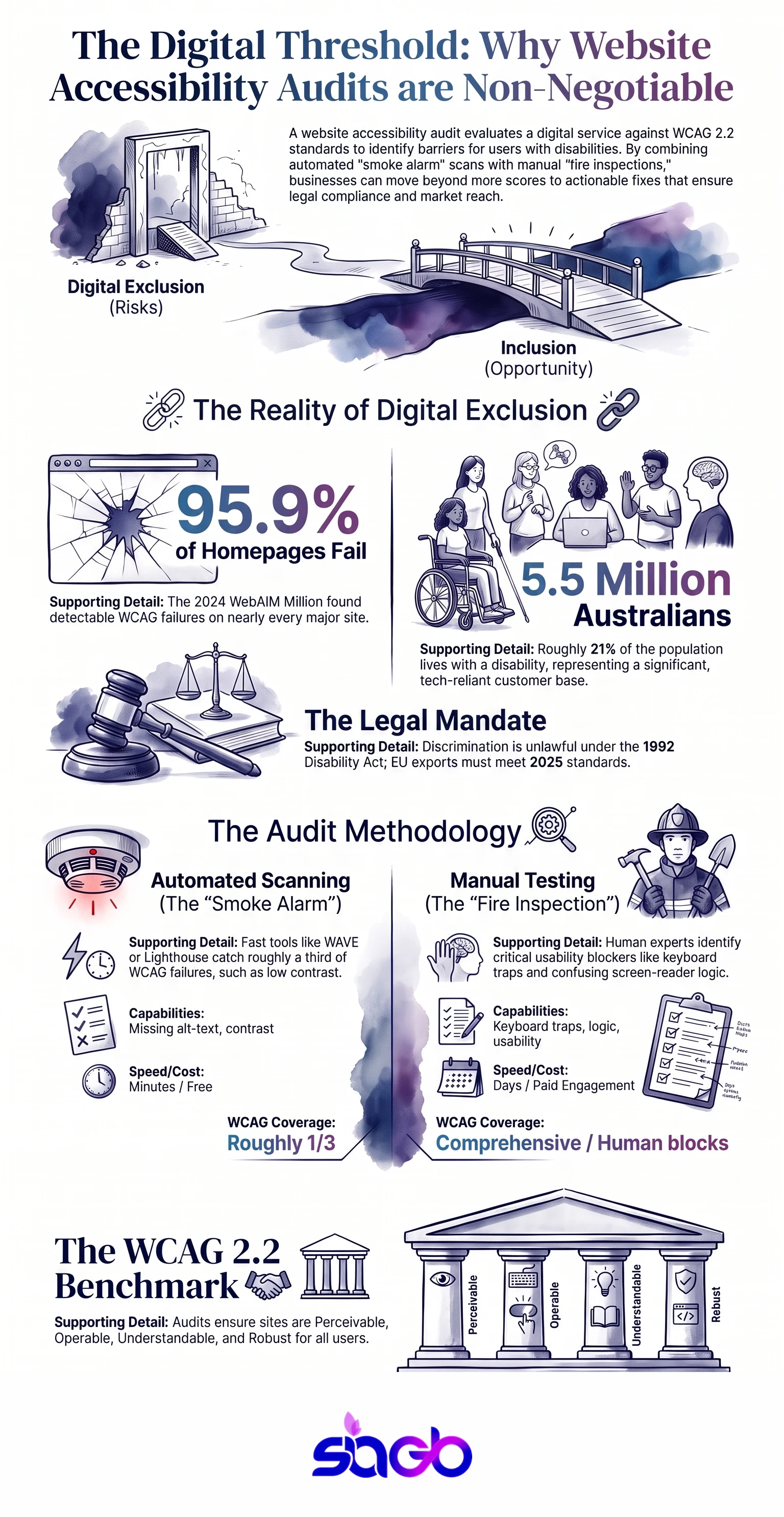
Infographic: How a Website Accessibility Audit Works
FAQ
What is a website accessibility audit?
A structured review of your site against WCAG, run to find the barriers that stop people with disability from using it. The useful ones mix automated scanning with real human testing, then hand back a ranked list of issues and a fix for each. A bare score isn’t an audit.
How long does it take?
Anywhere from a few days to a couple of weeks for a small-to-medium site. What drives the clock is the number of unique templates and whether screen-reader testing is included, not the headline page count. Two hundred pages off eight templates is really eight audits, and it’s quicker than it sounds.
How much does it cost?
It scales with scope. A quick automated scan of a few pages can be near-free with WAVE or axe. A full manual audit with a remediation plan is a paid piece of work, priced by templates and the WCAG level you’re targeting. Insist on a fixed scope so the bill doesn’t wander.
Do I need both automated and manual testing?
Yes, and roughly in that order. Automated tools clear the easy third fast and cheap. The barriers that genuinely block people, keyboard traps, focus order, screen-reader logic, meaningless alt text, only surface under human testing. One without the other leaves gaps.
Will an audit make my site compliant?
Not on its own. An audit tells you where you stand and what to fix. The compliance comes from doing the remediation afterwards. In Australia the DDA sets the duty and the AHRC treats WCAG as the yardstick, so the audit is your evidence, not your finish line.
Key takeaways
A website accessibility audit measures your site against WCAG 2.2 to find what stops people with disability from using it. It only works when automated scanning is paired with manual, human testing, since tools catch about a third of real issues and miss the ones that actually block people. Ask for findings by template, mapped to WCAG criteria, rated by severity and effort, with a re-test after remediation. In Australia the Disability Discrimination Act 1992 and the AHRC make WCAG the practical benchmark, so the audit is the evidence trail toward compliance, not compliance itself.
Want a scoped audit rather than a one-click scan? That’s the work we do in ADA and AHRC compliance, page by page, with a fix list you can actually act on.
Sources
- W3C, WCAG 2.2: https://www.w3.org/TR/WCAG22/
- W3C WAI, evaluating web accessibility: https://www.w3.org/WAI/test-evaluate/
- WebAIM, The WebAIM Million annual accessibility report: https://webaim.org/projects/million/
- Australian Human Rights Commission, World Wide Web Access, DDA Advisory Notes: https://humanrights.gov.au
Updated August 2026. Written by Sheetal Dhadial, founder of SIAGB, an AI-native consultancy in Sydney.

Want to explore this further?
Book a Free Consultation