
The problem every growing business hits
Picture a mid-sized manufacturing company. The sales team closes a big order and logs it in their spreadsheet. The warehouse team, working from a separate system, doesn’t know. Finance is reconciling invoices in yet another tool. By the time the order ships — late — three departments have contradicted each other at least twice, a manager has spent a Friday afternoon chasing down the truth in email threads, and nobody is quite sure what the real inventory figure is.
This is not a management failure. It’s an information architecture failure. And it’s exactly the problem that Enterprise Resource Planning — ERP — was designed to solve.
What ERP actually is
ERP is a category of software that pulls every core business function — finance, HR, purchasing, manufacturing, sales, supply chain — into a single shared system, backed by a single shared database. Instead of each department running its own tools with their own data, everyone draws from the same pool of information in real time.
The defining characteristic is not any individual feature. It’s integration. When a sales order is entered, inventory figures update automatically. When inventory dips below a threshold, a purchase order can trigger. When that purchase is received, accounting is notified. The whole chain happens in one connected system, not through a series of handoffs between people copying data between applications.
ERP systems range from small cloud-based platforms suited to a 20-person business all the way to massive global deployments running thousands of simultaneous users across dozens of countries. What they share is this idea: one system of record for the whole enterprise.
The core modules explained
An ERP is not a monolithic application — it’s a collection of specialised modules that share data. Most implementations start with a handful of essentials and expand from there. Here’s what those modules actually do.
Finance is the module that almost every ERP implementation starts with. It handles the general ledger, accounts payable and receivable, bank reconciliation, tax reporting, and financial close processes. Because every other module — purchasing, sales, payroll — generates financial transactions, finance sits at the centre of the whole system.
Human Resources manages the employee lifecycle: hiring records, contracts, time and attendance, payroll, benefits, and offboarding. In more advanced deployments it extends into performance management and workforce planning.
Supply Chain and Inventory gives businesses visibility over what they have, where it is, and when it needs replenishing. It tracks stock levels in real time, manages warehouse locations, handles inbound receipts, and connects to demand forecasting so you’re not ordering materials by gut feel.
Sales and CRM connects customer quotes and orders to the rest of the business. When a salesperson closes a deal, the order flows automatically into fulfilment and finance — rather than being re-keyed somewhere else.
Manufacturing modules handle production planning, bill of materials, work orders, and shop floor tracking. A manufacturer needs to know what to build, what components are required, and whether the production line is on schedule.
Procurement automates the buying side: supplier management, purchase order creation, approvals, goods receipts, and three-way matching between purchase orders, delivery notes, and invoices.
These modules don’t just coexist — they actively share data. A purchase order created in Procurement automatically appears as a liability in Finance. A production order in Manufacturing automatically reserves inventory in the Supply Chain module. That invisible plumbing is what gives ERP its value.
Deployment types: on-premise, cloud, and hybrid
For most of ERP’s history, businesses ran it on servers they owned. That gave them control but came with heavy upfront costs, lengthy implementation projects, and an IT team dedicated to keeping the lights on.
Cloud ERP changed the calculus significantly. Rather than buying and maintaining infrastructure, businesses pay a subscription and access the system through a browser. Updates happen automatically. New users can be added without a server upgrade. The total cost of ownership drops, and smaller companies can now access the same category of software that once required enterprise-grade budgets.
Hybrid deployments sit between the two — a company might keep its core financial system on-premise for regulatory reasons while running newer modules like HR or CRM in the cloud.
The right model depends on factors like data sensitivity, the pace of change the business needs, IT resources available, and whether regulatory obligations require data to stay within certain borders.
How AI is changing ERP — from record-keeper to thinking partner
Traditional ERP is brilliant at storing what happened. A sales order came in. A payment was made. A shipment left the warehouse. The system captures all of it faithfully.
The limitation is that it mostly tells you about the past. You have to look at the data yourself, notice trends, make decisions, and act. That’s where AI changes the fundamental character of ERP.
Here is how the shift looks across different parts of the system.
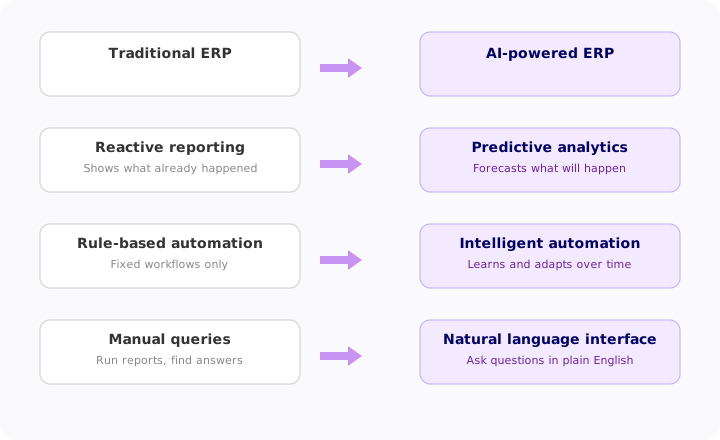
Predictive analytics and demand forecasting. Rather than waiting for a purchasing manager to notice that stock is running low, an AI-driven ERP can analyse sales velocity, seasonal patterns, supplier lead times, and even external signals like weather or market conditions to predict what you’ll need and when. It moves the decision from reactive to proactive.
Intelligent process automation. Traditional ERP automation follows rigid rules: if invoice X matches purchase order Y, approve it. AI-driven automation can handle exceptions — spotting that an invoice is slightly off because of a currency fluctuation, routing it appropriately, and flagging it with context rather than simply blocking it. It can also process unstructured inputs like emailed purchase orders or scanned documents, extracting data without manual re-entry.
Anomaly detection and fraud prevention. AI monitors transaction patterns continuously. When something deviates from established norms — an unusually large payment, a duplicate invoice, a vendor behaving differently — the system flags it in real time rather than waiting for an auditor to find it months later.
Natural language interfaces. One of the most practical AI additions is the ability to ask questions in plain English rather than building reports. A finance manager can type “show me which customers are more than 60 days overdue” or “what were our top five cost overruns last quarter” and get an answer directly, without configuring a query. This democratises data access — people who are not data analysts can get information from the system without depending on IT.
Predictive maintenance in manufacturing. For companies running production equipment, AI can analyse sensor data from machines and predict when maintenance will be needed before a breakdown occurs. The ERP system connects this prediction to purchasing (order the parts), scheduling (plan the downtime window), and finance (accrue the cost) — all automatically.
Smarter HR decisions. AI in the HR module can identify flight risk signals in employee data, suggest optimal hiring windows based on workload forecasts, flag payroll anomalies, and help managers understand workforce capacity before committing to delivery promises.
What AI in ERP cannot do — yet
It’s worth being precise about limitations. AI in ERP is a powerful augmentation layer, not a replacement for human judgment on complex, high-stakes decisions. A system can forecast that demand will rise 15% next quarter — but a human still needs to evaluate whether that forecast is plausible given what the sales team knows about a key customer relationship that doesn’t show up in the data.
AI models are also only as good as the data they’re trained on. An ERP with five years of messy, inconsistent historical data will produce less reliable predictions than one with clean, well-governed records. This is why companies that invest in data quality before deploying AI features tend to see much better results.
There is also the question of change management. An ERP that suggests a purchasing decision or recommends a staffing action is only useful if the people receiving those suggestions trust the system enough to act on them — and that trust is earned gradually, not assumed.
Who benefits most from AI-powered ERP?
Manufacturers benefit enormously — predictive maintenance and production scheduling have direct, measurable impact on uptime and output. Retailers and distributors get the most from demand forecasting and inventory optimisation. Finance teams gain from automated reconciliation and anomaly detection. And leadership at every kind of company benefits from the shift toward real-time, forward-looking dashboards rather than backwards-looking reports.
Smaller businesses are increasingly able to access these capabilities too. Cloud ERP vendors have packaged AI features into standard subscription tiers, meaning a company with 50 employees can now use forecasting and automation tools that would have required a dedicated data science team just a few years ago.
The bottom line
ERP started as a way to stop departments from working in silos. That core value — shared data, connected processes — hasn’t changed. What’s changing rapidly is the layer of intelligence sitting on top of that foundation.
The best way to think about AI in ERP is not as a new system that replaces the old one, but as a thinking partner that watches everything the system records and continuously surfaces what matters — before you think to ask. It turns an operational record-keeper into something closer to an operational advisor.
For businesses evaluating ERP today, the question is no longer just “which modules do we need?” It’s increasingly “how much intelligence do we want built into the system, and are we ready to act on what it tells us?”