The Brief
All Health Medical Group runs 7 clinics across North New Jersey — Hackensack, Hackensack 83 Summit Ave, Maywood, Englewood Cliffs, Paramus, Paterson, and Rutherford. They run on AthenaOne, which manages their EHR, billing, scheduling, and patient records. Everything internal works.
The problem is that AthenaOne doesn’t expose public online appointment booking in a way that works for new patients arriving from a marketing site. Its booking flows are built around patients who are already registered in the athenahealth patient portal — which is fine for existing patients, but useless for the bulk of web traffic: prospective patients who just Googled “GP near me” and want to book right now.
The practice was taking every new-patient appointment by phone. Across 7 clinics and 29 clinicians, that’s a front-desk bottleneck. And when patients can’t book online, plenty of them just close the tab and go to whichever competing practice offered a one-click option.
They asked us to make public booking work.
The Challenge
The market’s standard answer is a third-party booking platform — NextPatient, Zocdoc, DocASAP — that integrates with AthenaOne and exposes an embeddable JavaScript widget. We started there, with NextPatient.
Two problems showed up immediately.
Problem one: NextPatient’s out-of-box widget only supports booking by location. That flow works for some practices, but All Health Medical Group has 9 distinct specialties across their clinics — Primary Care, Weight Loss, Menopause Center, Neurology, Cardiology, Podiatry, POTS Center, Pediatrics, and Telehealth. Patients search by specialty first, not by suburb. A dermatology patient in Paramus does not want to scroll through the Hackensack GPs to find what they’re looking for.
Worse, a lot of patients already know the clinician they want. They read a bio page, they got a referral, they watched a video. For them, the right flow is to pick the provider directly and book. The vendor’s widget didn’t support that either — it only exposed per-provider booking once you’d first picked a location.
Problem two: the vendor’s widget ships with a fixed light theme that clashed with the client’s site. The practice runs a dark, minimal design with black backgrounds and high-contrast type. NextPatient’s default widget is white cards on a light grey background with vendor-blue accents. Dropping it onto the page looked exactly like what it was: a third-party bolt-on. And NextPatient doesn’t expose a theming API. You get what they ship.
The client needed public booking that looked like it belonged to their site, let patients find care three different ways, and worked on mobile without feeling second-class.
What We Built
1. A custom 3-tab selection UI wrapping NextPatient
Three distinct entry points, one underlying booking engine.
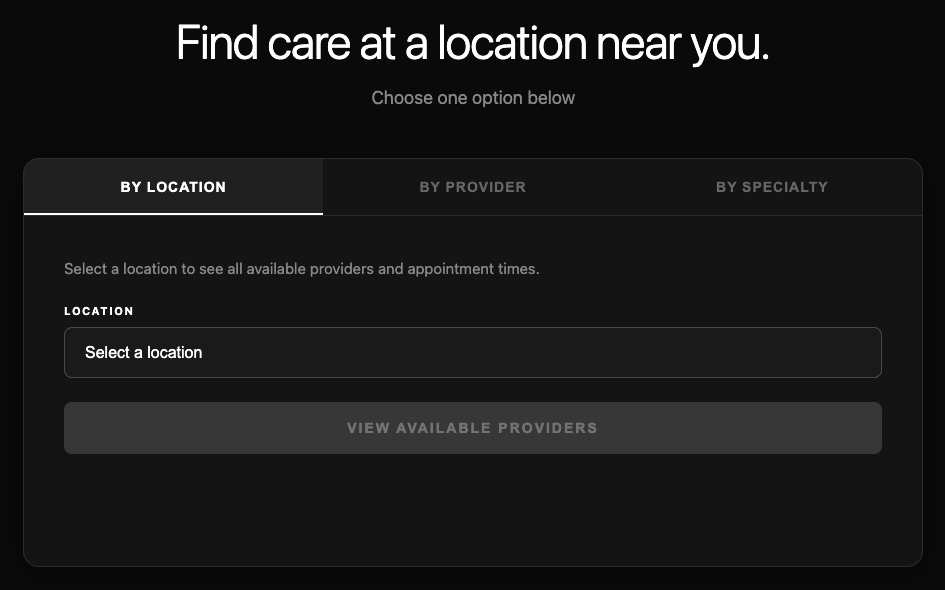
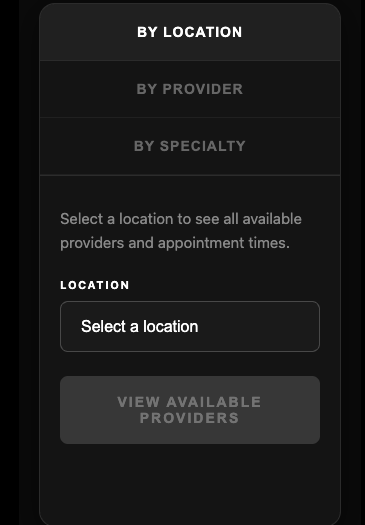
By Location. A clean dropdown of all 7 clinics. Patients who know which clinic they want (usually because it’s closest to them) pick it and see every available provider at that location.
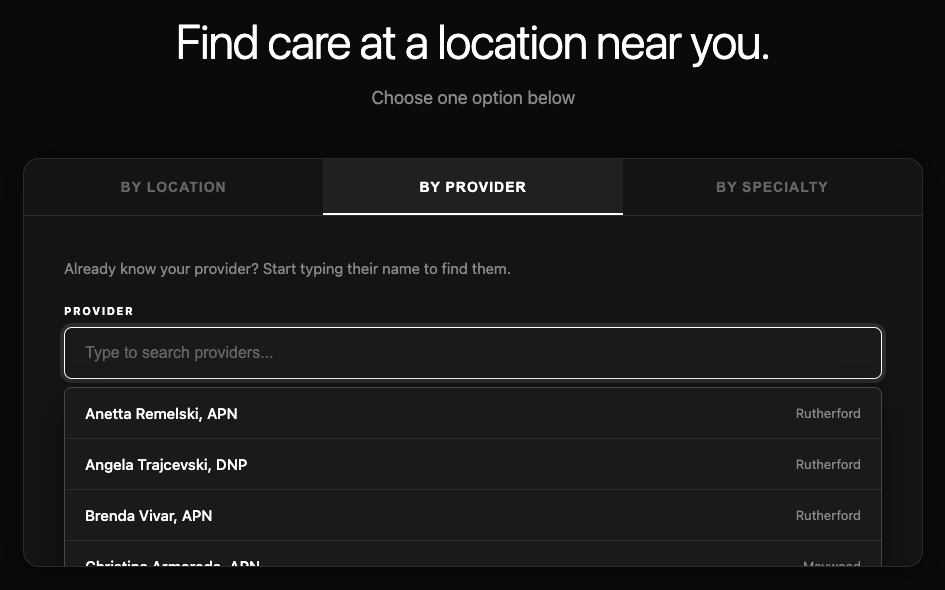
By Provider. A typeahead search across all 29 providers in the network. We show the provider’s credentials and their home clinic inline, with inline specialty tags on the providers who have them (e.g. “Dr. Marion Bobb-McKoy · Family Medicine · Englewood Cliffs”, “Dr. Ravinder Tikoo · Neurology · Paramus”). Keyboard-navigable with arrow keys, Enter to select, Escape to close. Filter hits on provider name and clinic location, so “rutherford” surfaces every provider in that clinic.
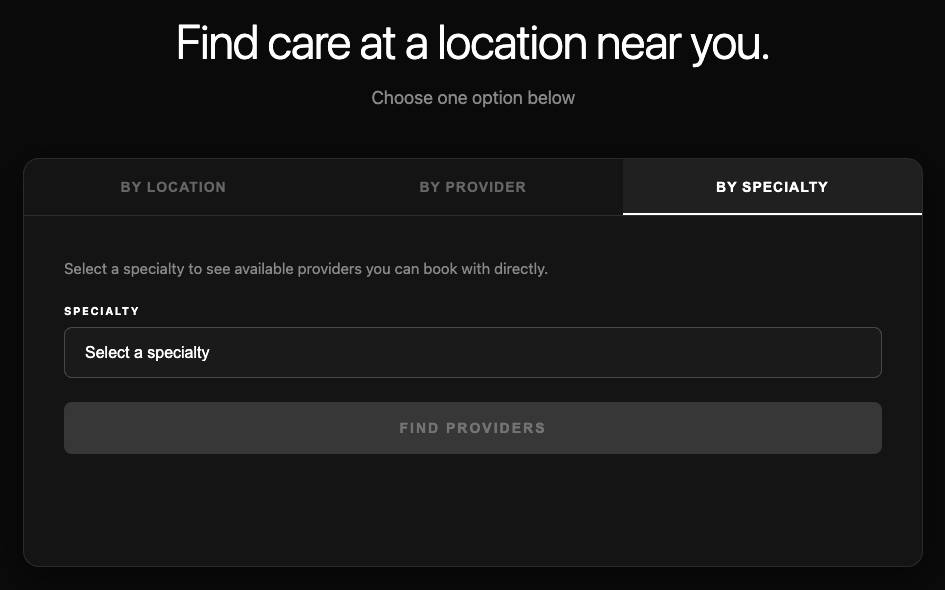
By Specialty. The one the vendor doesn’t support. Dropdown of 9 specialties — Primary Care, Weight Loss, Menopause Center, Neurology, Cardiology, Podiatry, POTS Center, Pediatrics, Telehealth. Pick one and we filter our own provider roster (not the vendor’s) to the subset tagged with that specialty, render a clean inline provider list, then hand off to NextPatient for the actual booking.
2. Cascading specialty → provider → booking flow
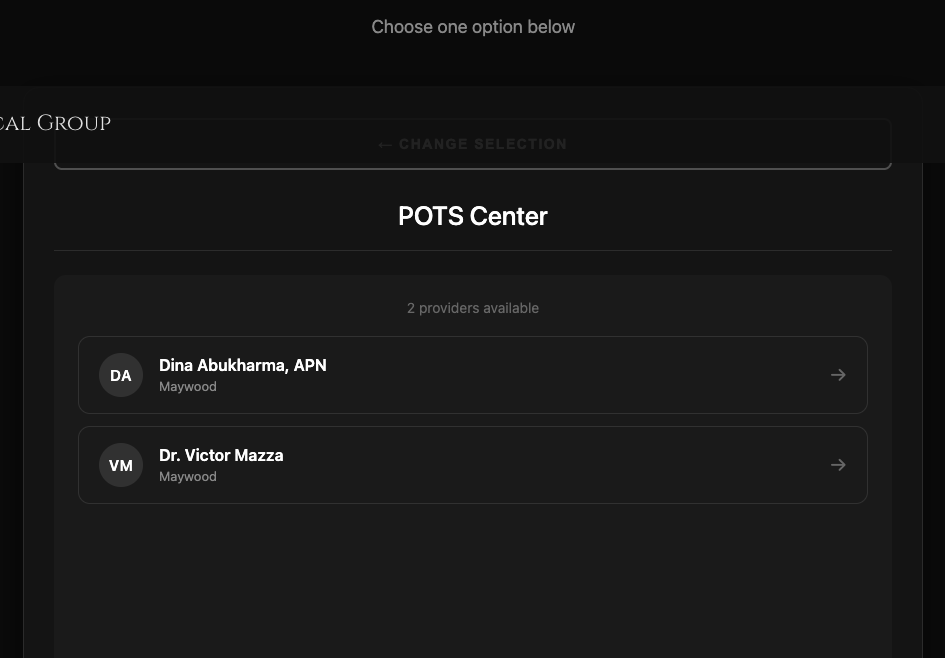
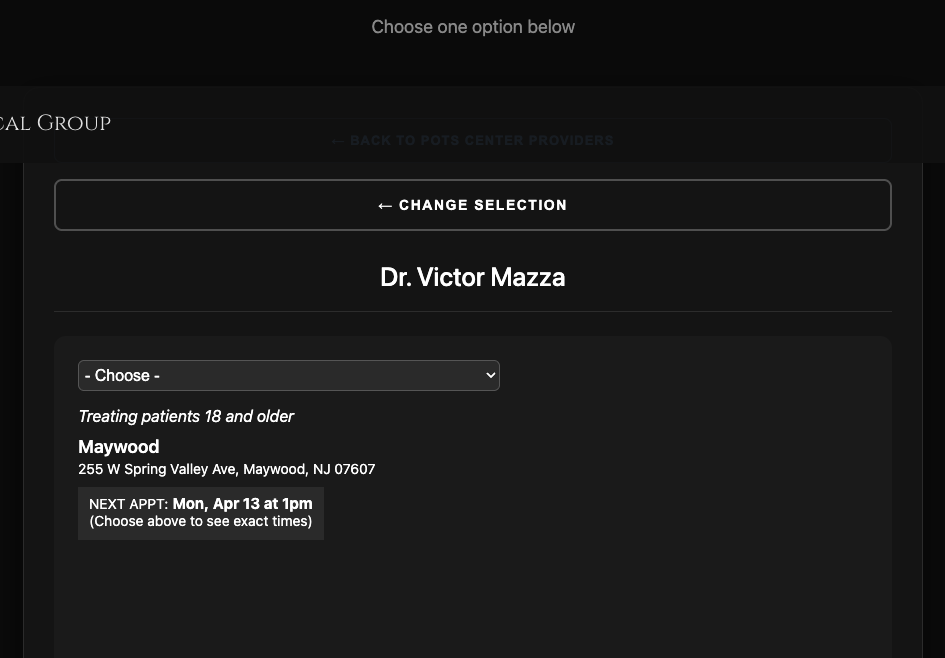
Picking a specialty doesn’t just filter. It surfaces a dedicated shortlist with provider initials, name, and clinic — all in the same dark-themed UI as the rest of the page. For POTS Center, for example, the flow resolves to two providers (Dina Abukharma, APN and Dr. Victor Mazza, both in Maywood). The patient clicks one, the NextPatient widget for that provider boots in place, and they pick their reason for visit and appointment slot without ever leaving the page.
3. The dark theme override — the real technical unlock
NextPatient ships a light theme only. The vendor doesn’t expose a theming API. The usual options are (a) live with the light theme, or (b) give up and build your own widget from scratch. We took the third option: runtime override.
After we inject NextPatient’s JavaScript, we run two loops in parallel. One is a polling-based theme applier that walks every injected DOM node, reads its computed background/text/border colors, and rewrites them via setProperty(..., 'important'). It runs at 12 intervals from 300ms to 15 seconds, so it catches nodes that render late from the vendor’s own async operations. The other is a 30-attempt content-readiness detector that only fades out the loading overlay when real content (nextpatient-provider or nextpatient-schedule nodes) actually appears in the DOM. That guarantees the patient never sees a flash of unstyled vendor markup before the theme applies.
The override covers white-to-dark backgrounds, text colors, link states (including visited), time-slot buttons and “More…” links, table rows, form inputs, and a 5-level parent guard so provider portraits stay transparent and visible.
The result: the NextPatient widget renders with the exact same dark theme as the rest of the client’s site. Reason-for-visit dropdowns, appointment slots, cancellation fine-print — all of it consistent. It reads like a native part of the site, not a bolt-on.
4. Individual provider deep-linking
Every provider on the team has a deep-linkable booking URL via fragment — /book-now#<provider-id>. Share the link from an email signature, a Google search snippet, a newsletter, a provider bio page. The widget boots straight into that provider’s booking flow with no intermediate clicks.
This is what lets the practice run provider-specific marketing campaigns — a newsletter about a new cardiologist can link directly to that cardiologist’s booking page, not the generic clinic hub.
5. Mobile-first responsive
Most medical searches happen on phones. The 3-tab UI collapses cleanly to a stacked column under 600px, with each tab as a full-width row. The provider typeahead dropdown adapts its max-height so it scrolls within the viewport instead of pushing content off-screen.
Results
- 3 booking modes — By Location, By Provider, By Specialty — across a single unified widget
- 29 providers with individual booking flows, all deep-linkable
- 7 clinic locations wired in with per-location provider rosters
- 9 medical specialties searchable with cascading provider filtering
- Runtime dark-theme override on a vendor widget that doesn’t support theming — a hard technical unlock
- Zero vendor native support for public booking on AthenaOne before we stepped in
The widget is live at allhealthmedgroup.org/book-now — you can walk through all three flows, pick any specialty, and see the same NextPatient booking engine render with the client’s dark theme in every branch.
Technical Notes
The integration layer doesn’t store or transmit Protected Health Information — patient data flows directly from the browser to NextPatient to the AthenaOne backend, so HIPAA compliance stays with the EHR and booking vendors where it belongs. We keep our code free of any collection that would drag PHI into our scope.
The whole implementation is portable. The same pattern — custom selection UI wrapping a third-party booking vendor, plus runtime theme override — works for any practice running AthenaOne with NextPatient, and the selection-UI pattern alone ports to Zocdoc, DocASAP, Epic MyChart, or any vendor that exposes an embeddable public booking widget. See our Healthcare EHR Integration service for the productised version.
Part of a longer engagement
This is SIAGB’s third shipped piece of work for All Health Medical Group. See also:
- All Health Medical — BI & Dashboards — unified data across clinics with 60% faster reporting
- All Health Medical — ADA Compliance — 77% accessibility error reduction after four previous vendors failed